Multi-service gateway testing with CDRouter
Multi-service gateways are typically configured with two or more independent, logical WAN connections, or channels, for different services — such as data/internet, management, voice, video/IPTV, etc.
These service channels are aggregated onto a single physical WAN connection using VLANs. This lets operators manage, route, and prioritize traffic for a large number of subscribers.
CDRouter can easily test gateways configured for multiple services, ensuring your products deliver them effectively to subscribers and businesses.
Basic Test Setup
Each service channel is independent, with its own IP stack, WAN connectivity options, and configuration. Internal routing mechanisms within the gateway determine how traffic is routed between the various services that are provisioned.
The primary service channel may optionally be dual-stack, supporting both IPv4 and IPv6 connectivity on the WAN.
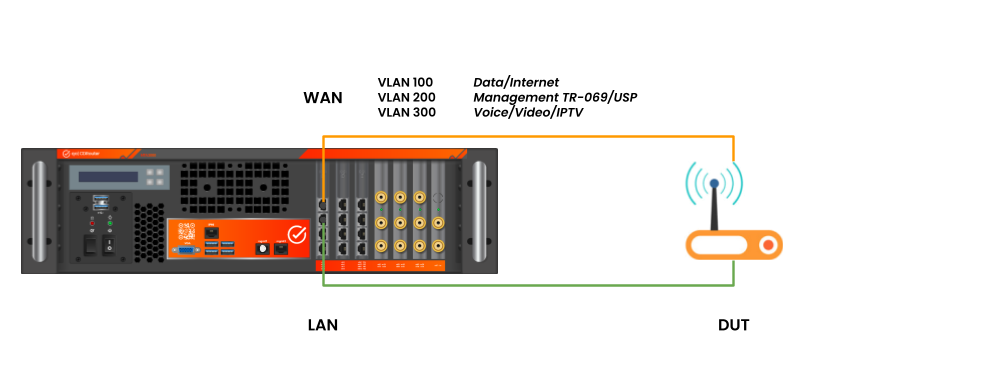
The basic test setup for a multi-service gateway is very similar to that of an Ethernet-to-Ethernet router: there’s a single physical WAN connection.
That connection may be:
- A direct Ethernet connection, or
- Delivered over a GPON, DOCSIS, DSL, or Fixed Wireless (5G/LTE) access network
The key difference from a standard router setup is that multiple logical connections run over that single WAN interface, each on its own VLAN.
A basic CDRouter test setup for an Ethernet-to-Ethernet multi-service gateway is shown below. (The device under test, or DUT, is the Ethernet-to-Ethernet multi-service gateway.)
Connecting via GPON, DOCSIS, DSL, or Fixed Wireless
When the DUT’s WAN connection instead uses GPON, DOCSIS, DSL, or Fixed Wireless (5G/LTE), an appropriate concentrator terminates that access-network connection and routes the aggregated service channels upstream to CDRouter via Ethernet.
The concentrator depends on the access technology in use:
- GPON — an OLT (Optical Line Terminal)
- DOCSIS — a CMTS (Cable Modem Termination System)
- DSL — a DSLAM (Digital Subscriber Line Access Multiplexer)
- Fixed Wireless (5G/LTE) — a base station (gNodeB or eNodeB)
The test setup for a gateway connected through one of these concentrators is shown below.
The only difference from the direct Ethernet setup is the addition of the concentrator. It terminates the DUT’s WAN connection and routes all service channels from the DUT upstream via Ethernet, which connects directly to CDRouter.
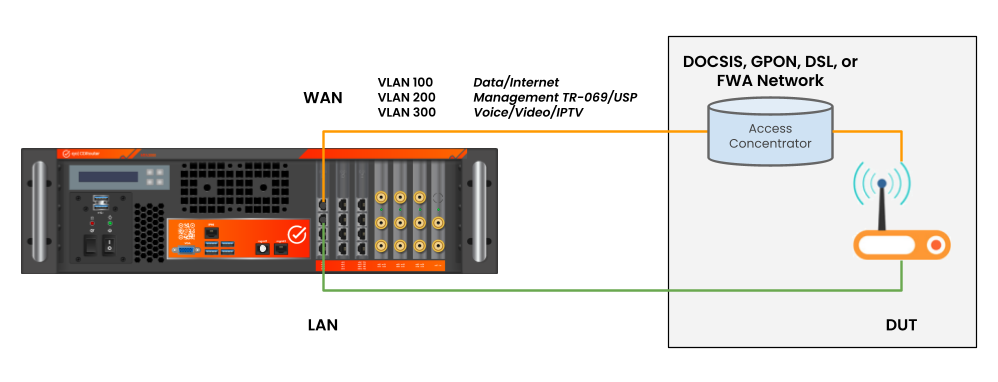
In both setups, the LAN side of the gateway requires no special configuration and behaves like any other gateway. The multi-service aspect is independent of the LAN configuration — internal routing mechanisms handle routing traffic between the LAN and the applicable service channel, and vice versa.
CDRouter Example Configuration
CDRouter treats each service channel as a separate WAN connection. This requires the CDRouter Multiport expansion, which allows multiple unique WAN VLAN interfaces to be defined to handle each type of traffic.
For this example, let’s assume the DUT is a multi-service gateway with three service channels, as shown in the diagrams above. Each service channel has a unique VLAN ID.
-
The DUT sends management traffic on its “Data / Internet” channel with VLAN tag 100. This channel connects to a PPPoE server and supports both IPv4 and IPv6.
-
Management traffic is sent on a dedicated “Management” channel with VLAN tag 200. This channel only supports IPv4 via DHCP.
-
A third “Voice / Video / IPTV” channel, VLAN tag 300, is used for the DUT’s multicast and real-time traffic, which also uses DHCP and supports only IPv4.
This is summarized below:
| Service Channel | WAN Interface | VLAN ID | IPv4 WAN Mode | IPv6 WAN Mode |
|---|---|---|---|---|
| Data / Internet | Primary (wan) | 100 | PPPoE | PPPoE with DHCPv6 PD |
| Management | Secondary (wan2) | 200 | DHCP | None |
| Voice / Video / IPTV | Secondary (wan3) | 300 | DHCP | None |
Although in this example, the DUT only supports PPPoE and IPv6 on the primary VLAN, CDRouter supports any combination of PPPoE/DHCP and IPv4/IPv6 on all of its WAN interfaces.
Primary WAN
The gateway’s “Data / Internet” service channel should be associated with CDRouter’s primary WAN interface in the Base Configuration section of the config file.
In this example, this interface supports a dual-stack connection using PPPoE for IPv4, and PPPoE plus DHCPv6 with prefix delegation for IPv6. IPv6 settings for the primary interface are found under the “CDRouter IPv6 Expansion” section.
Its WAN-side CDRouter configuration is shown below (note that this is only a partial configuration):
# -- Primary WAN - Data / Internet channel

SECTION "Base Configuration" {
    testvar wanInterface              eth2

    testvar wanMode                   PPPoE
    testvar wanIspIp                  202.254.1.1
    testvar wanIspAssignIp            202.254.1.2
    testvar wanIspMask                255.255.255.0

    testvar wanVlanId                 100

    testvar pppoeUser                 qacafe
    testvar pppoePassword             qacafe123
    testvar pppoeAcName               qacafe-ac
    testvar pppoeServiceName          any

    testvar wanDomainName             qacafe.com
    testvar wanDnsServer              202.254.101.1
    testvar wanBackupDnsServer        202.254.101.2

    testvar ntpServer1                3.3.3.6
    testvar ntpServerName1            time.nist.gov
    testvar ntpServer2                3.3.3.7
    testvar ntpServerName2            pool.ntp.org

}


SECTION "CDRouter IPv6 Expansion" {

    testvar supportsIPv6		      yes
    testvar ipv6WanMode		          PPPoE
    testvar ipv6PPPoEAddressMode      DHCP
    testvar ipv6WanIspIp              3001::1
    testvar ipv6WanIspAssignIp        3001::2
    testvar ipv6WanIspPrefixLen       64

    testvar dhcpv6WanEnablePD         yes
    testvar dhcpv6WanAssignPrefix     3001:dddd::
    testvar dhcpv6WanAssignPrefixLen  48

}
Secondary WANs
The DUT’s “Management” and “Voice / Video / IPTV” must be configured as additional WAN interfaces on the same physical interface, under the Multiport Expansion section of the config file.
Each interface is defined in its own testvar_group block, with a specific naming convention:
- CDRouter’s default, primary WAN interface defined in the “Base Configuration” section is not explicitly named, but is referred to as “wan” internally.
- The names of secondary WAN interfaces defined in testvar_groups must be indexed as “wan2”, “wan3”, etc.
Management service channel
# -- Secondary WAN - Management service channel

SECTION "CDRouter Multiport Expansion" {

    testvar_group wan2 {

        testvar wanInterface          eth2

        testvar wanMode               DHCP
        testvar wanIspIp              202.254.2.1
        testvar wanIspAssignIp        202.254.2.2
        testvar wanIspMask            255.255.255.0

        testvar wanVlanId             200

        testvar wanDnsServer          202.254.102.1
        testvar wanBackupDnsServer    202.254.102.2

        testvar ntpServer1            3.3.4.6
        testvar ntpServerName1        time.nist.gov
        testvar ntpServer2            3.3.4.7
        testvar ntpServerName2        pool.ntp.org
    }

}
Voice / Video / IPTV service channel
# -- Secondary WAN - Voice / Video / IPTV service channel

SECTION "CDRouter Multiport Expansion" {

    testvar_group wan3 {

        testvar wanInterface          eth2

        testvar wanMode               DHCP
        testvar wanIspIp              202.254.3.1
        testvar wanIspAssignIp        202.254.3.2
        testvar wanIspMask            255.255.255.0

        testvar wanVlanId             300

        testvar wanDnsServer          202.254.103.1
        testvar wanBackupDnsServer    202.254.103.2

        testvar ntpServer1            3.3.5.6
        testvar ntpServerName1        time.nist.gov
        testvar ntpServer2            3.3.5.7
        testvar ntpServerName2        pool.ntp.org
    }

}
Additional WAN interfaces may be added for any other service channels the gateway may support.
Management Traffic (TR-069 and USP)
Many multi-service gateways also support remote device management, using:
- TR-069 (CWMP), or
- USP (User Services Platform, TR-369)
When testing gateways that confine management traffic to a separate, dedicated service channel, the CDRouter config file must indicate which of the secondary Multiport WAN interfaces its TR-069 ACS or USP Controller servers should attach to in order to communicate with the DUT.
In this example, the DUT supports both TR-069 and USP traffic on the “Management” service channel, which is the “wan2” testvar_group in the CDRouter config file.
- For TR-069 traffic: go to the “CDRouter TR-069 Expansion” section of the config file and set the
acsInterfacetestvar to “wan2”.
SECTION "CDRouter TR-069 Expansion" {

    testvar supportsCWMP                     yes

    SECTION "Basic ACS Configuration" {

        testvar acsInterface                     wan2

    }

}
- For USP traffic: go to the “CDRouter USP Expansion” section of the config file and set the
uspControllerInterfacetestvar to “wan2”.
SECTION "CDRouter USP Expansion" {

    testvar supportsUSP                      yes

    SECTION "Basic Controller Configuration" {

        testvar uspControllerInterface           wan2

    }

}
Note that each of these servers must be properly configured in order to successfully communicate with the DUT. See the TR-069 User Guide and USP User Guide, as well as the Training Videos library for help with configuring these protocols.
Multicast Traffic
CDRouter supports testing multicast traffic on secondary WAN interfaces. The global multicastInterface testvar specifies which network interface CDRouter uses for multicast testing.
Multicast is commonly used to deliver IPTV, so in this example “Voice / Video / IPTV” is the appropriate channel. Set multicastInterface to “wan3”:
testvar multicastInterface wan3
CDRouter will ignore multicast traffic received on any interface other than “wan3”. This feature applies to multicast over both IPv4 and IPv6.
SIP Traffic
CDRouter can dedicate a multi-service WAN interface to SIP test traffic. Once assigned, CDRouter ignores SIP traffic received on any other interface.
Since voice traffic in this example is carried on “Voice / Video / IPTV”, set the global sipInterface testvar to “wan3”:
testvar sipInterface wan3
This feature also works with both IPv4 and IPv6 SIP traffic.
Quick Reference: Testvars by Channel
| Testvar | Purpose | Config section | Value in this example |
|---|---|---|---|
acsInterface |
TR-069 (ACS) traffic | TR-069 Expansion | wan2 (Management) |
uspInterface |
USP traffic | USP Expansion | wan2 (Management) |
multicastInterface |
Multicast / IPTV traffic | Multiport Expansion | wan3 (Voice / Video / IPTV) |
sipInterface |
SIP / voice traffic | Multiport Expansion | wan3 (Voice / Video / IPTV) |
