Connecting CDRouter to a GPON Network
Overview
In a production or shared lab environment, an OLT’s upstream connection usually points to a live network gateway. To successfully test a CPE in this environment, you must ensure that test traffic is properly steered away from the live network and toward CDRouter.
Core Concepts
-
Traffic Forwarding: All test traffic forwarded by the CPE (DUT) must reach CDRouter’s WAN interface.
-
The Reserved Address Block: CDRouter’s emulated services (DNS, NTP, ACS, Remote Hosts) exist in a “virtual space.” A block of IP addresses that are unique to your lab must be allocated for these services to use (e.g.,
202.254.101.0/24or3001:ff00::/64). -
Routing to CDRouter: Because these virtual services are not physically on the wire, the network must be told how to find them. This is typically done by configuring static routes in the network to use CDRouter’s physical WAN interface address as the next-hop for any traffic destined for the Reserved Address Block.
Connectivity Scenarios
Scenario A:
Same Layer-2 Segment (Direct Connection)
CDRouter’s WAN interface and the OLT’s upstream interface are connected to the same physical switch or broadcast domain. The OLT routes traffic between the DUT and CDRouter.
- Solution: Add a static route directly to the OLT. The OLT will treat CDRouter as a “router” on its own subnet to reach the Reserved Address Block. CDRouter will route traffic back to the DUT via the IP address of the connected OLT interface.
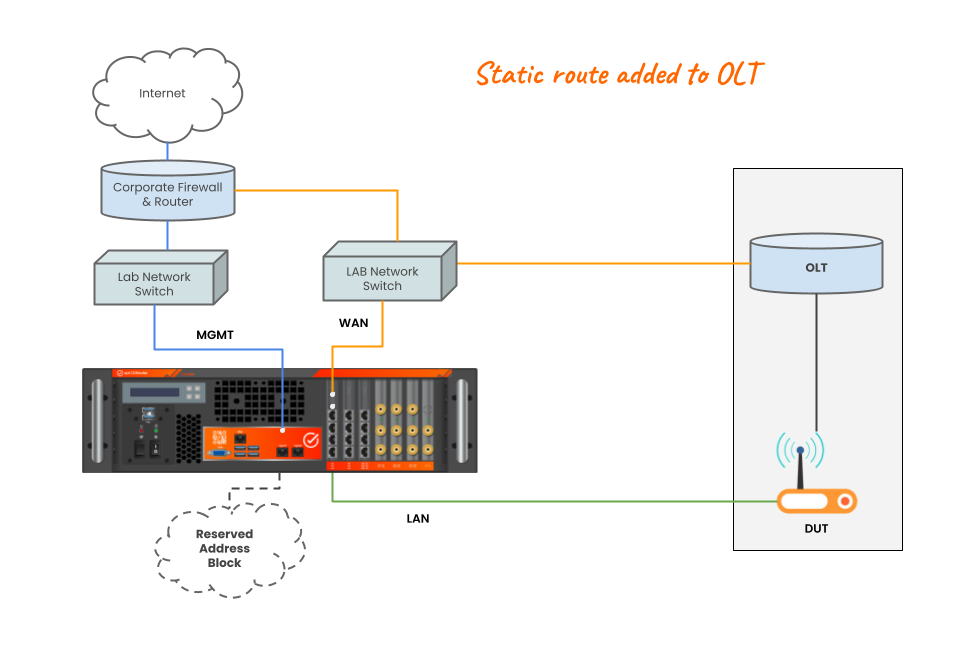
Scenario B:
Different Layer-2 Segments (Multiple Router Hops)
One or more IP routers separate CDRouter from the OLT. This is a common “live network” setup.
- Solution: You must add static routes to the intermediate routers in the lab. The router directly connected to CDRouter must point the Reserved Address Block traffic to CDRouter’s WAN IP. The IP address of that router will be used as CDRouter’s “gateway” to reach the DUT.
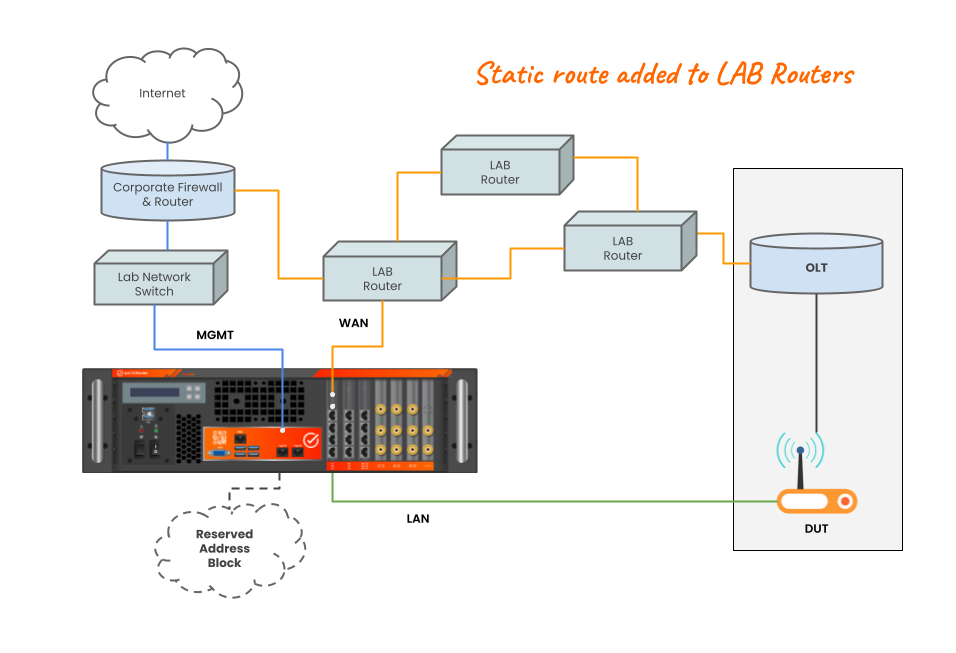
Scenario C:
Same Logical Layer-2 Segment
A specific VLAN is provisioned through the live network to connect the DUT and CDRouter. This creates a logical Layer-2 “tunnel” between them.
- Solution: The DUT and CDRouter behave as if they are directly connected. The DUT uses CDRouter’s IP address as its default router for all destinations.
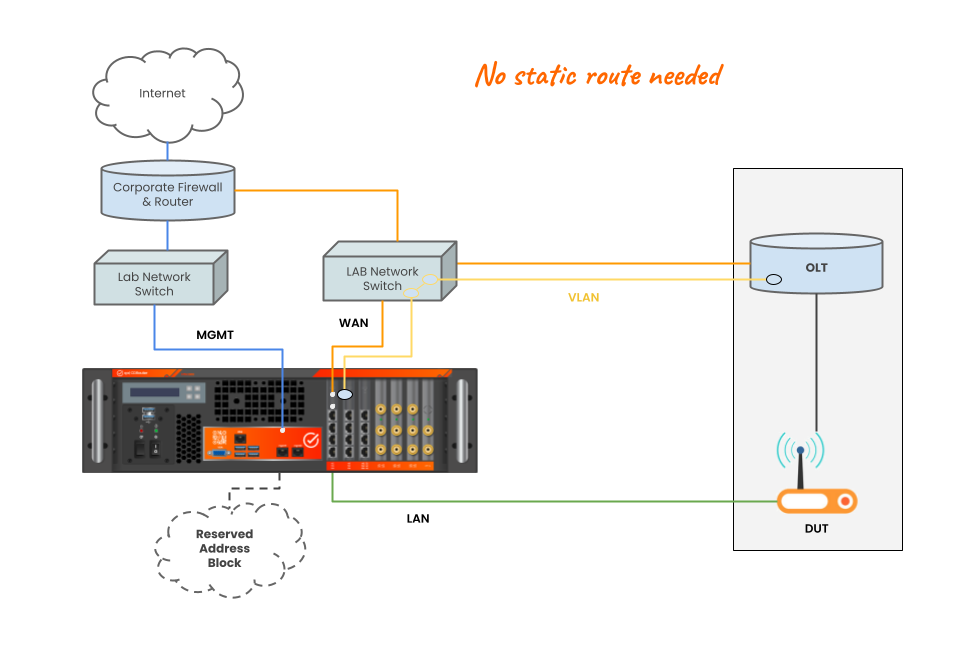
DHCP Relay Configuration
In a shared lab or production environment, an existing DHCP server is likely already provisioning other ONTs and gateways on the OLT. To test your DUT with CDRouter’s built-in DHCP server, you need to ensure that the DUT’s DHCP requests are relayed to CDRouter rather than to your corporate or lab server.
The right approach depends on your OLT’s role in the network. Determine which of the following applies to your environment before proceeding:
| Scenario | OLT Role | Who configures the relay? |
|---|---|---|
| A | L3 gateway (acts as DHCP relay agent directly) | Configure relay on the OLT |
| B | L2 aggregator (DHCP relay lives on upstream router) | Configure relay on the upstream BNG/router |
| C | L2 VLAN between DUT and CDRouter | No relay needed — CDRouter responds directly |
Scenarios A & B — Configuring DHCP Relay
In Scenarios A and B, the relay agent (OLT or upstream BNG) is currently forwarding all subscriber DHCP requests to your existing DHCP server. You need to add a relay rule that identifies your DUT specifically and forwards its DHCP requests to CDRouter’s WAN IP instead.
Step 1: Identify the DUT on the relay agent
The relay agent needs a way to distinguish the DUT’s DHCP traffic from other ONTs/subscribers it is serving. The most common identifiers are:
- OLT port / ONT slot — if the relay agent supports per-port relay policies, configure the policy on the specific port the DUT is connected to.
- Client MAC address — some relay agents support MAC-based relay policies or DHCP class matching.
- VLAN — if the DUT is isolated on its own subscriber VLAN, configure the relay policy for that VLAN only.
Consult your OLT or BNG documentation for the specific method supported by your platform.
Step 2: Configure the relay target
Set the relay target for the DUT’s traffic to CDRouter’s WAN IP address
(wanIspIp/ipv6WanIspIp in your CDRouter config). CDRouter’s built-in DHCP server will
respond to the relayed request and assign an address from the pool defined
in your config.
Step 3: Verify existing relay rules are unaffected
Confirm that the relay rules for other ONTs/subscribers continue to point to your existing DHCP server. Only the DUT’s relay target should be changed.
VLAN Configuration
In any of the above scenarios, CDRouter can automatically add VLAN tags to WAN traffic if the link requires it. See the VLAN Tagging in CDRouter article for configuration details.
Example Configurations
Your CDRouter config file contains testvars to set the WAN IP addresses of both CDRouter and the CPE. The examples below illustrate when CDRouter’s WAN address needs to be in the same IPv4 subnet or IPv6 prefix and when it must not, depending on whether its physical interface is on the same Layer-2 segment as the CPE.
Note that the addresses used in these examples are only provided as an example. You will need to allocate addresses for CDRouter’s WAN interface and “Reserved Address Block” that align with your existing network address scheme and topology.
CPE and CDRouter on DIFFERENT Layer-2 Segments
(Includes Scenario A direct OLT connection and Scenario B with intermediate routers)
When the DUT and CDRouter are separated by one or more routers, the “WAN link” is split into two distinct segments. CDRouter uses “gateway” testvars to identify the next-hops that will forward CDRouter test traffic.
In this case, each of the following WAN address testvar pairs must be defined in separate IPv4 subnets or IPv6 prefixes corresponding to their respective segments:
| Protocol | Segment | Testvar Pair | Defined By |
|---|---|---|---|
| IPv4 | CDRouter Link | wanIspIp / wanIspGateway |
wanIspMask |
| IPv4 | CPE/OLT Link | wanIspAssignIp / wanIspAssignGateway |
wanIspAssignMask |
| IPv6 | CDRouter Link | ipv6WanIspIp / ipv6WanIspGateway |
ipv6WanIspPrefixLen |
| IPv6 | CPE/OLT Link | ipv6WanIspAssignIp |
ipv6WanAssignPrefixLen |
IPv4 Configuration
testvar  wanMode                    DHCP

testvar  wanIspIp                   202.254.1.1
testvar  wanIspGateway              202.254.1.2
testvar  perfWanIp                  202.254.1.3
testvar  wanIspMask                 255.255.255.0

testvar  wanIspAssignGateway        202.254.2.1
testvar  wanIspAssignIp             202.254.2.2
testvar  wanIspNextIp               202.254.2.3
testvar  wanIspAssignMask           255.255.255.0

testvar  IPv4HopCount               2
IPv6 Configuration
testvar  ipv6WanMode                DHCP

testvar  ipv6WanIspIp               3001:A::1
testvar  ipv6WanIspGateway          3001:A::2
testvar  perfWanIpv6                3001:A::3
testvar  ipv6WanIspPrefixLen        64

testvar  ipv6WanIspAssignIp         3001:B::2
testvar  ipv6WanIspNextIp           3001:B::3
testvar  ipv6WanAssignPrefixLen     64

testvar  IPv6HopCount               2
CPE and CDRouter on the SAME Layer-2 Segment
(Scenario C with provisioned VLAN)
In this setup, the WAN interfaces of CDRouter and the DUT are in the same broadcast domain and no IP routing is required. This corresponds to CDRouter’s default configuration template with all WAN interface address testvars in the same IPv4 subnet and IPv6 prefix:
IPv4 Configuration
testvar  wanMode                    DHCP

testvar  wanIspIp                   202.254.1.1
testvar  wanIspAssignIp             202.254.1.2
testvar  wanIspNextIp               202.254.1.3
testvar  perfWanIp                  202.254.1.4
testvar  wanIspMask                 255.255.255.0

testvar  IPv4HopCount               1

# -- Unused --
# testvar  wanIspGateway              202.254.1.2
# testvar  wanIspAssignGateway        202.254.2.1
# testvar  wanIspAssignMask           255.255.255.0
IPv6 Configuration
testvar  ipv6WanMode                DHCP
testvar  ipv6WanIspIp               3001::1
testvar  ipv6WanIspAssignIp         3001::2
testvar  ipv6WanIspNextIp           3001::3
testvar  perfWanIpv6                3001::4
testvar  ipv6WanIspPrefixLen        64

testvar  IPv6HopCount               1

# -- Unused --
# testvar  ipv6WanIspGateway          3001:A::2
# testvar  ipv6WanAssignPrefixLen     64
Reserved Address Block
In any of the above scenarios, CDRouter’s virtual servers should be assigned unique addresses from the Reserved Address block. This ensures all test traffic forwarded by the DUT will be routed properly and received by CDRouter’s WAN interface.
# -- IPv4 202.254.101.0/24

testvar wanDnsServer         202.254.101.1
testvar wanBackupDnsServer   202.254.101.2
testvar ntpServer1           202.254.101.3
testvar ntpServer2           202.254.101.4
testvar remoteHostIp         202.254.101.5
testvar acsIp                202.254.101.6
testvar uspControllerIpv4    202.254.101.7
testvar FreeNetworkStart     202.254.101.16
testvar FreeNetworkStop      202.254.101.254
testvar FreeNetworkMask      255.255.255.240

# -- IPv6 3001:ff00::/32

testvar ipv6WanDnsServer           3001:ff00::1
testvar ipv6WanBackupDnsServer     3001:ff00::2
testvar ipv6NtpServer1             3001:ff00::3
testvar ipv6NtpServer2             3001:ff00::4
testvar ipv6RemoteHost             3001:ff00::5
testvar acsDualStackIp             3001:ff00::6
testvar uspControllerIpv6          3001:ff00::7
testvar ipv6FreeNetworkStart       3001:ff00:1::1
testvar ipv6FreeNetworkStop        3001:ff00:ffff::ffff
testvar ipv6FreeNetworkPrefixLen   64
Summary Checklist
-
Static Routes: Ensure every router in the path has a route for the Reserved Block using CDRouter’s
wanIspIpas the next-hop. -
DHCP Relay (Scenarios A & B): Identify the DUT’s traffic on the relay agent (by OLT port, VLAN, or MAC address) and configure its relay target to CDRouter’s WAN IP (
wanIspIp). Confirm that relay rules for all other ONTs/subscribers are unchanged. -
DHCP Relay (Scenario C): No relay is needed. Verify that broadcast traffic is not being suppressed on the provisioned VLAN.
-
No Overlaps: Ensure the Reserved Block does not overlap with any existing subnets in your lab.
-
VLAN Tagging: In Scenario C, verify that the VLAN ID on CDRouter matches the OLT’s configuration and that intermediate switches are trunking the VLAN correctly.
