Overriding testvar values at runtime
Testvar values can be overridden when you launch a package, allowing you to apply configuration changes to the job being launched without modifying the underlying config file.
Testvar override options can be added through the following methods:
- Manually, when launching packages in CDRouter’s Web UI.
- Passed as arguments to automation scripts that use the REST Web API or cdrouter.py Python module.
- Saved with the test package so they are applied each time the package is run.
Overriding testvars is useful for making quick configuration changes at runtime when debugging configuration problems or experimenting with new testvar combinations.
It also allows you to streamline your automation workflow by reducing the number of unique configurations you need to save and maintain.
Structured Testvar override options
Testvar override options are composed of four parts:
| Field | Description |
|---|---|
| Action | The type of override to be applied |
| Group | The name of a testvar_group (eg "wan2", "lan3"), or "main" |
| Name | The name of the testvar to override |
| Value | The testvar’s new value |
The following override actions are supported:
-
Set Testvar changes the value of a testvar. This works even if the testvar is commented out or missing from the config file. Testvars can be overridden at the main config level or within a named testvar_group. If the testvar_group doesn’t exist in the config file or is disabled with
IGNORE, CDRouter creates it automatically (see Caveats below). -
Delete Testvar reverts a testvar to its default, as if it were commented out or removed from the config file. (no value specified)
-
Delete Group removes a testvar_group and every testvar in it, as if the group were removed from the config file or disabled with the
IGNOREkeyword. (no testvar name or value specified)
Examples:
| Override | Action | Group | Name | Value |
|---|---|---|---|---|
| Set a testvar in main config | set-testvar |
main | lanInterface | eth4 |
| Set a testvar in a testvar_group | set-testvar |
lan2 | lanInterface | eth5 |
| Delete a testvar in main config | delete-testvar |
main | lanSSID | |
| Delete a testvar in a testvar_group | delete-testvar |
lan3 | lanSSID | |
| Delete a testvar_group | delete-group |
lan4 |
Overriding in the Web UI
-
Launch the package from the Packages page. The Launch this package window opens.
-
Click Add a testvar. A new override row appears.
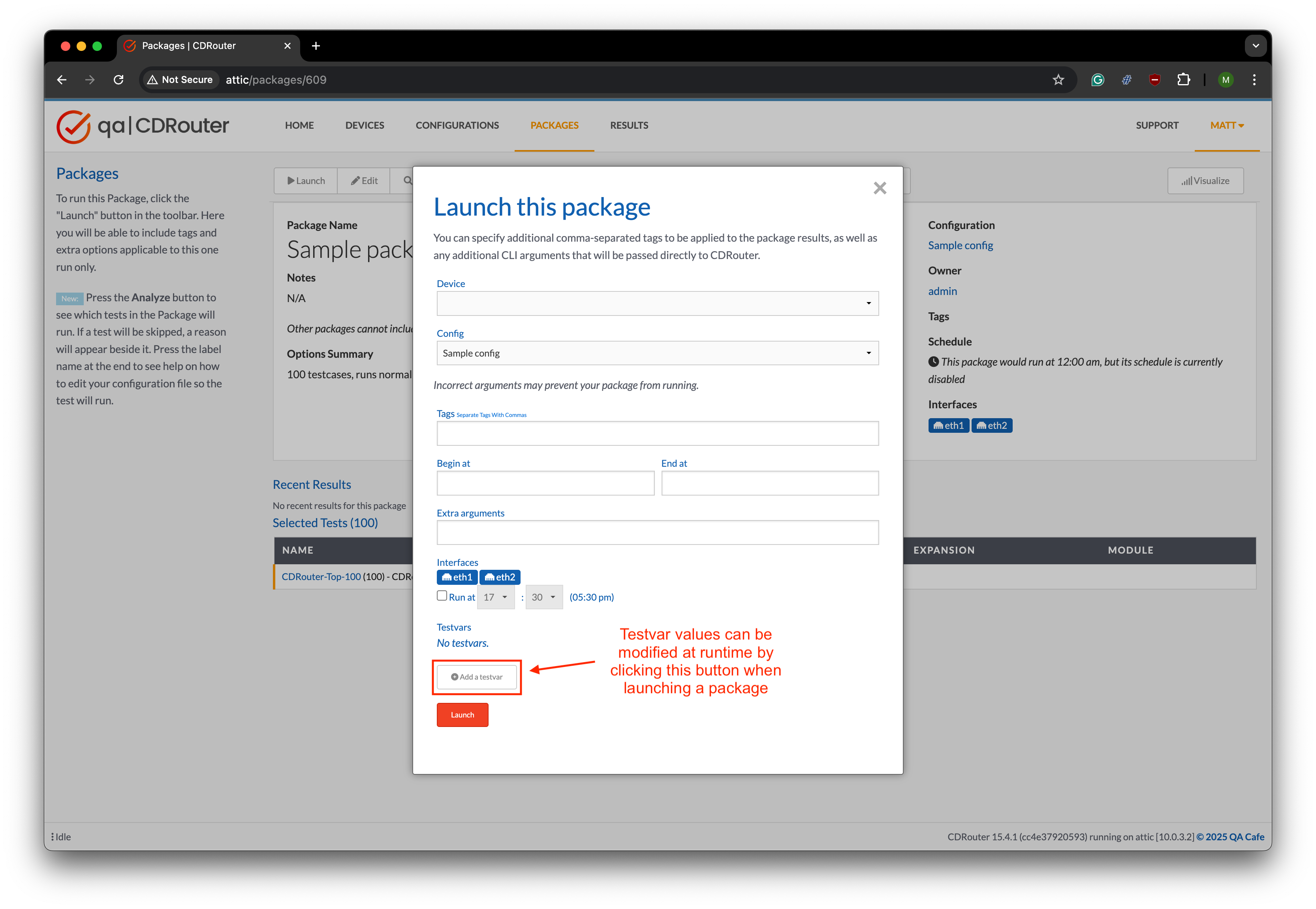
-
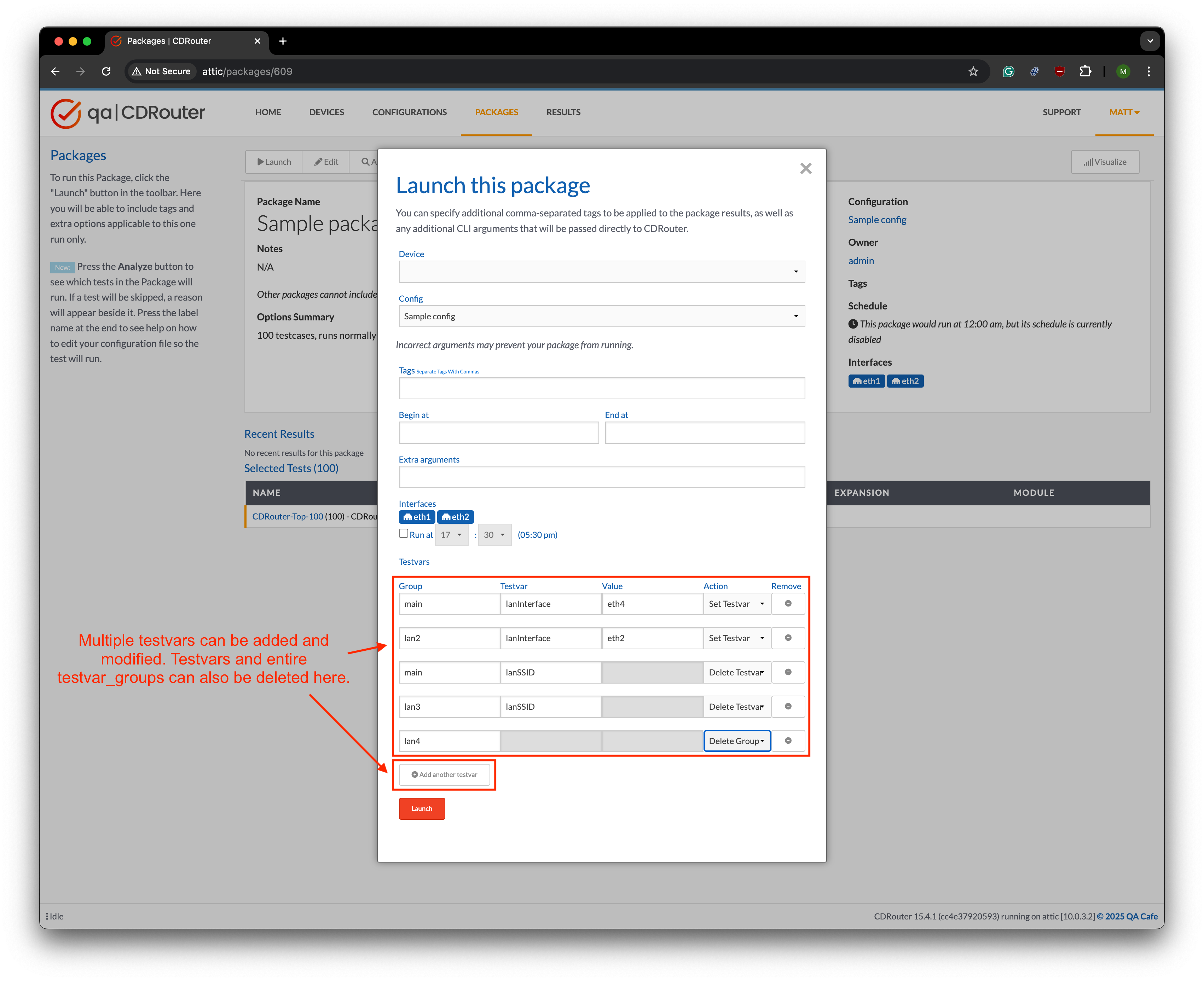
In the new row, enter the Group and Name, then choose an Action. For Set Testvar, also enter a Value.
-
Repeat for each override. To remove one, click the × in its Remove column.
The window below shows the five example overrides from this page:
-
Click Launch.
Overriding in the REST API
The CDRouter Web API can apply testvar
overrides when launching a test package through the /jobs endpoint.
Send a POST request as described in the “Launch a
job” section of the API
documentation, and include the testvar override options as a JSON list
in the options.testvars field of the request body:
POST /api/v1/jobs/
{
  "package_id": "123",
  "options": {
    "testvars": [
      {
        "group": "main",
        "name": "lanInterface",
        "value": "eth4",
        "action": "set-testvar"
      },
      {
        "group": "lan2",
        "name": "lanInterface",
        "value": "eth5",
        "action": "set-testvar"
      },
      {
        "group": "main",
        "name": "lanSSID",
        "action": "delete-testvar"
      },
      {
        "group": "lan3",
        "name": "lanSSID",
        "action": "delete-testvar"
      },
      {
        "group": "lan4",
        "action": "delete-group"
      }
    ]
  }
}
Overriding in the cdrouter.py Python module
In a script using the cdrouter.py Python module, override testvars by
including a list of Testvar objects to options attribute of the Job
passed to the jobs.launch() method. Each Testvar takes the action,
group, name and value fields described above.
from cdrouter import CDRouter
from cdrouter.configs import Testvar
from cdrouter.jobs import Job, Options

c = CDRouter('http://nta3000', token='aabbccdd')

testvars = [
    Testvar(group='main', name='lanInterface', value='eth4', action='set-testvar'),
    Testvar(group='lan2', name='lanInterface', value='eth5', action='set-testvar'),
    Testvar(group='main', name='lanSSID', action='delete-testvar'),
    Testvar(group='lan3', name='lanSSID', action='delete-testvar'),
    Testvar(group='lan4', action='delete-group'),
]

job = Job(package_id='123', options=Options(testvars=testvars))
queued_job = c.jobs.launch(job)
Overriding with CLI arguments
You can also override testvars using CLI arguments as an alternative to the structured Testvar override options above. Instead of providing structured Testvar override options, a list of CLI-style options are added to an string field at the time a package is launched.
CLI arguments have their own syntax to specify the override action,
group, name, and value elements.
| Override | CLI argument |
|---|---|
| Set a testvar in main config | -testvar lanInterface="eth4" |
| Set a testvar in a testvar_group | -testvar_group lan2:lanInterface="eth5" |
| Delete a testvar in main config | -delete-testvar lanSSID |
| Delete a testvar in a testvar_group | -delete-testvar_group lan3:lanSSID |
| Delete a testvar_group | -delete-group lan4 |
In the examples below, all CLI argument overrides must be specified together as a single string with spaces separating each argument.
Package options
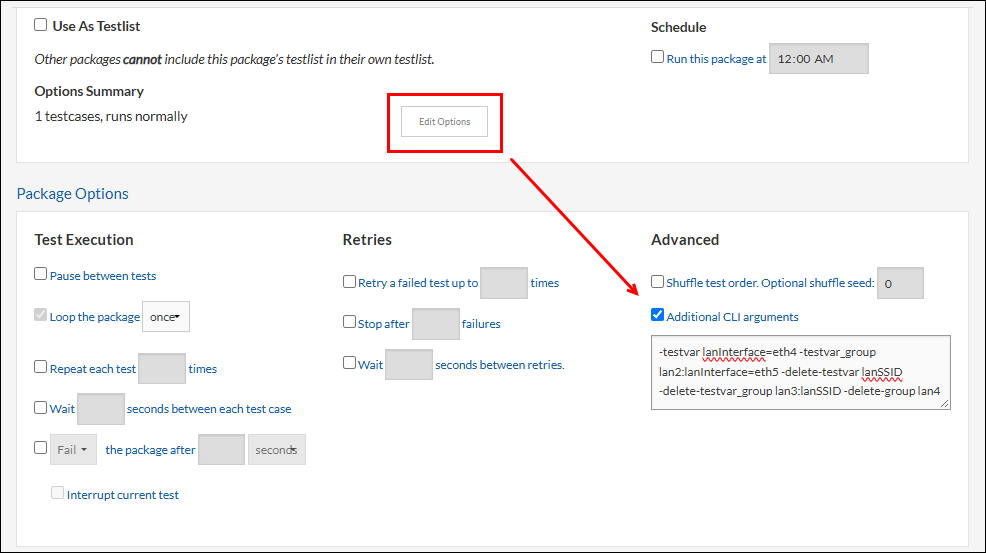
CLI arguments can be saved persistently in the Options section of the test package itself, so that your custom testvar overrides are applied automatically each time you launch the package.
-
Open the package and click Edit Options.
-
Under Package Options > Advanced, select Additional CLI arguments, then enter the arguments in the text box.
-
Save the package.
Web UI
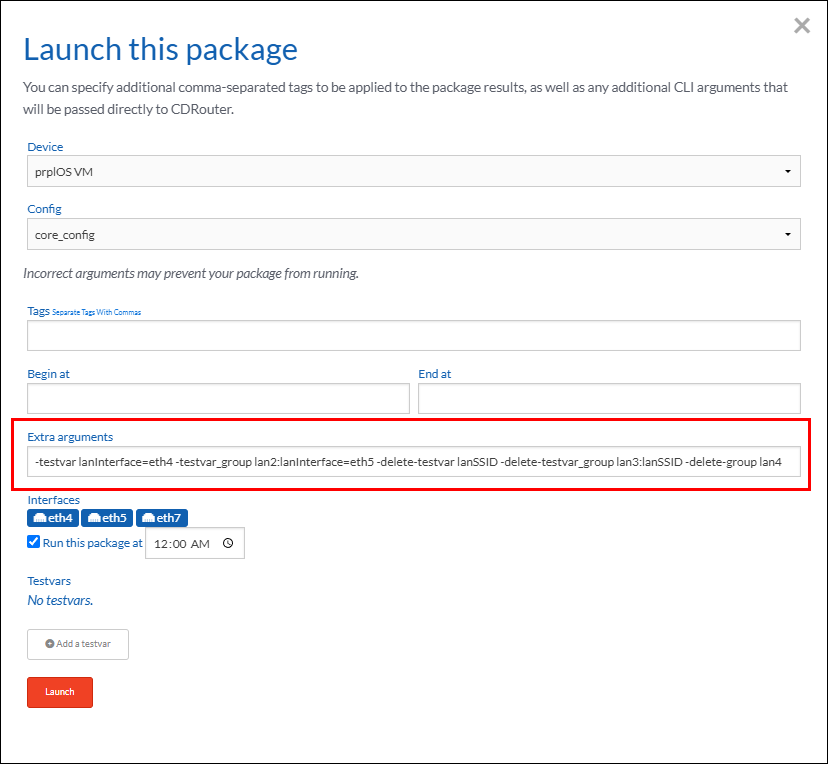
In the Launch this package window, enter the arguments in the Extra arguments field, then click Launch.
REST API
Use the extra_cli_args field instead of testvars in the JSON options
object to override testvars with a list of CLI arguments.
POST /api/v1/jobs/
{
  "package_id": "123",
  "options": {
    "extra_cli_args": "-testvar lanInterface=eth4 -testvar_group lan2:lanInterface=eth5 -delete-testvar lanSSID -delete-testvar_group lan3:lanSSID -delete-group lan4"
  }
}
cdrouter.py Python module
Use the extra_cli_args option instead of testvars in the Job.options
object to override testvars with a list of CLI arguments.
from cdrouter import CDRouter
from cdrouter.jobs import Job, Options

c = CDRouter('http://nta3000', token='aabbccdd')

testvars_list = [
    '-testvar lanInterface=eth4',
    '-testvar_group lan2:lanInterface=eth5',
    '-delete-testvar lanSSID',
    '-delete-testvar_group lan3:lanSSID',
    '-delete-group lan4'
]
testvars = ' '.join(testvars_list)

job = Job(package_id='123', options=Options(extra_cli_args=testvars))
queued_job = c.jobs.launch(job)
Verifying overrides
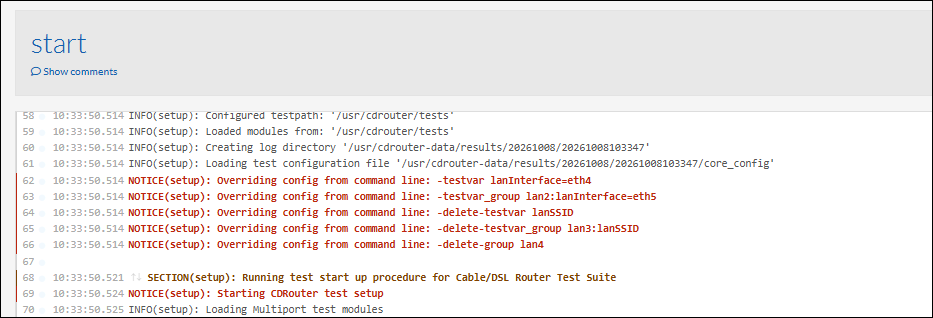
When a test run starts, CDRouter logs a notice in the start log for each override it processes. The notice always uses the CLI argument format, no matter which method was used:
Caveats
Precedence of override methods
The structured Testvar options above are the preferred method to override testvars. To avoid confusion, Testvar override options and CLI arguments should not be used together.
However, if multiple methods are used to override the same testvar, they will be applied in the order below, with the last one taking precedence over the others:
- CLI arguments in the package’s Additional CLI arguments field
- Structured overrides in the Web UI launch popup, or the
testvarsjob option - CLI arguments in the Web UI Extra arguments field, or the
extra_cli_argsjob option
Setting a testvar in an ignored group doesn’t restore the rest of the group
If a testvar_group exists in the config file but is disabled with the
IGNORE keyword, setting a testvar in that group with an override option
doesn’t enable the group and all of its other testvars. CDRouter creates
the group instead, and all testvars that are not overridden are treated
as commented out and use their default values, if they have one.
Overrides don’t update buddy::getvar references
CDRouter reads the config file and resolves every [buddy::getvar <testvar>]
reference before it applies any overrides. A testvar that references an
overridden testvar therefore keeps the value from the config file.
For example, suppose the RestartDut testvar calls a script
and passes and interface name as an argument by referencing the value of
lanInterface:
testvar RestartDut "/usr/cdrouter-data/custom/myScript [buddy::getvar lanInterface]"
If you override the lanInterface , the override itself takes effect,
but RestartDut has already been resolved with the original
lanInterface value from the config file.
To have RestartDut use the new value, override
RestartDut too, with the new lanInterface value
written out in full.
