CloudShark 5.3.0
November 12th, 2026
We are excited to announce CloudShark Enterprise 5.3, which adds a built-in MCP server your AI agent can use to search, read, and annotate the captures in your CloudShark repository. New Zeek and Suricata APIs also make network security data available to your own tooling.
This release also closes a stored cross-site scripting issue in annotation rendering and fixes an annotations API bug that allowed writes to read-only captures. If you administer CloudShark, see For Administrators for what to set up so your users can take advantage of this release. Read on, and let us know what you think!
What’s New
MCP Server
CloudShark Enterprise now includes an MCP server for AI agents such as Claude
Code. Your agent can
find captures, run Deep Search across the whole repository, query and decode
packets, follow streams, read Zeek logs, and review Suricata alerts. It can also
annotate the packets behind its findings, so a teammate can check each one
against the evidence. Annotations written by your agent start with MCP:, and
they are the only thing it can change.
CloudShark does not have AI built in. There is no model to host and nothing to install. The MCP server runs on your CloudShark system, and your agent and its model, hosted or local, do the analysis. See the MCP server overview for the full list of tools.
The MCP server is off by default, and an administrator turns it on in
services.conf. See For Administrators.
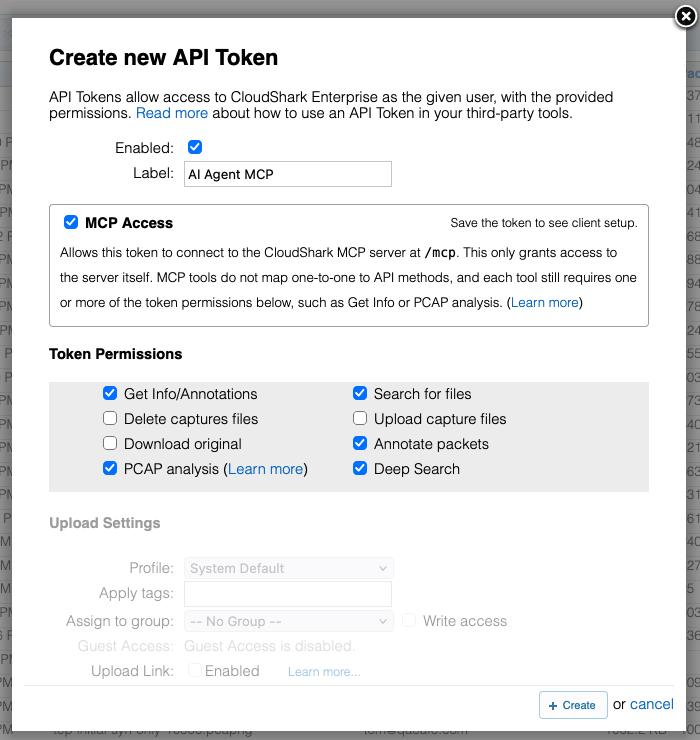
To connect, check MCP Access on an API token, along with the permissions for the tools your agent needs. Your agent only reaches captures the token’s user can see. Once the token is saved, the token dialog shows ready-to-paste setup for Claude Code, Cursor, VS Code, and Codex. See Connecting Your Agent.
Zeek and Suricata APIs
Zeek and Suricata results for any capture you can access are now available through the v2 API. The Zeek API lists and downloads Zeek logs, runs grouping queries against them, such as top talkers or port 443 traffic that isn’t TLS, and turns a Zeek connection into a display filter for its packets. The Suricata API returns a ranked triage summary of a capture’s alerts, the individual alerts behind it, and the rule that raised each one. Both require the PCAP analysis permission on the API token.
Suricata runs on demand through the API. If a capture has never been scanned, or its results predate the current ruleset, the first request runs the scan and then answers, the same as the Threat Assessment page.
See the Zeek API documentation and Suricata API documentation for endpoint reference and examples.
For Administrators
Zeek and Suricata do not work after upgrading the OVA from CloudShark 5.0 through 5.2 until you complete the steps in Upgrading the OVA from 5.0 through 5.2.
A few things to check after installing or upgrading so your users can take advantage of 5.3:
- Turn on the MCP server. It is off by default, on new installs and
upgrades. Add an
[mcp]section withenabled = trueto/usr/cloudshark/etc/services.conf, then runsystemctl restart cloudshark-service-gateway. See Turning On the MCP Server. - Let users create their own API tokens. Each agent connects to the MCP server with an API token, and by default users can’t create one. Turn on User Managed API Tokens in Settings, or create tokens for your users. See Who Can Create MCP Tokens.
- Check token permissions. The Zeek and Suricata APIs and most MCP tools need the PCAP analysis permission on the token.
- Decide where capture data can go. An agent sends capture data to wherever its model runs. If your policies don’t allow hosted models for this traffic, point users to a local model. See Your Data.
- Know where MCP activity is logged. Each MCP call is logged to
/usr/cloudshark/log/mcp-audit.jsonlby default, separate from the activity log. See MCP Administration to change the log location. - Update scripts that write annotations. Changing annotations through the API now requires write access to the capture, so scripts that annotate captures their token can only read will start failing. See Security.
Security
- Stored XSS in annotations fixed. Packet annotations shown in the Info dialog are now displayed as plain text instead of Markdown, so existing Markdown in annotations appears as raw text. Profile descriptions and collections still support Markdown.
- Annotations API respects read-only captures. Earlier versions let the API write annotations to captures you don’t own and could only read. Changing annotations through the API now requires write access to the capture, and is recorded in the activity log.
System Component Upgrades
- Zeek 9.0
- Suricata 8.0.7
- Wireshark 4.6.9
- Packet Viewer 2026.10
Bug Fixes and Other Changes
- Fixed copying text from the Packet Details pane on Windows. Hold Ctrl while selecting to highlight and copy field names and values, the same way Cmd works on macOS.
- Fixed an issue where annotations added through the API showed HTML entities
such as
<and&. Annotations already written through the API keep their escaped text. - Fixed client and server byte totals being swapped in follow stream results from the API. The Follow Stream view in CloudShark already showed them correctly.
- Fixed OVA upgrades where the
/storagedisk from a 5.2.0 appliance could not be attached to a new OVA in ESXi. The OVA now uses a VMware Paravirtual SCSI controller. - The installer now enables the CRB repository on Rocky and RHEL 9, so
dnf updateno longer fails on installed-develpackages such aslibpcap-devel. suricata-updatenow uses the correct rules location.- The search button in the Packet Details pane is now easier to see.
- Fixed a Suricata scan race where a request arriving during a scan could read incomplete results or start a second scan.
Upgrading
CloudShark Enterprise 5.3 is available to download as an OVA disk image ready to import into VMware or compatible platforms.
Customers running CloudShark Enterprise 5.x can upgrade by following the OVA Upgrade Guide. When upgrading from 5.0 through 5.2, also follow Upgrading the OVA from 5.0 through 5.2 after attaching your data disk.
If upgrading from CloudShark Enterprise 3.15, please see our detailed migration instructions for moving your existing data and settings to the new OVA deployment outlined in the OVA Migration Guide.
