DS-Lite Testing with CDRouter
Dual-Stack Lite (DS-Lite) is an IPv4-over-IPv6 transition technology defined in RFC 6333. It lets a service provider run an IPv6-only access network while still giving its customers access to the IPv4 Internet through a shared pool of public IPv4 addresses.
CDRouter simulates the service provider’s side of a DS-Lite network, so you can verify a CPE’s DS-Lite functionality and run CDRouter’s IPv4 and IPv6 tests through its DS-Lite connection.
For an overview of all of the IPv6 WAN modes and transition technologies that CDRouter supports, see IPv6 WAN Modes and Transition Technologies.
How DS-Lite works
A DS-Lite network has two main elements:
- The B4 (Basic Bridging BroadBand) element is the CPE. It has native IPv6 service on its WAN, and provides IPv4 (and usually IPv6) service to clients on its LAN.
- The AFTR (Address Family Transition Router) is in the service provider network, and connects to the IPv4 Internet.
The B4 doesn’t perform NAT. Instead, it encapsulates IPv4 packets from its LAN clients in IPv6 and sends them through an IPv4-in-IPv6 tunnel to the AFTR. The AFTR removes the IPv6 header and performs NAT before forwarding the packets to the IPv4 Internet. Because the AFTR can tell customers apart by the IPv6 address of each B4, many customers can use the same private IPv4 addresses on their LANs.
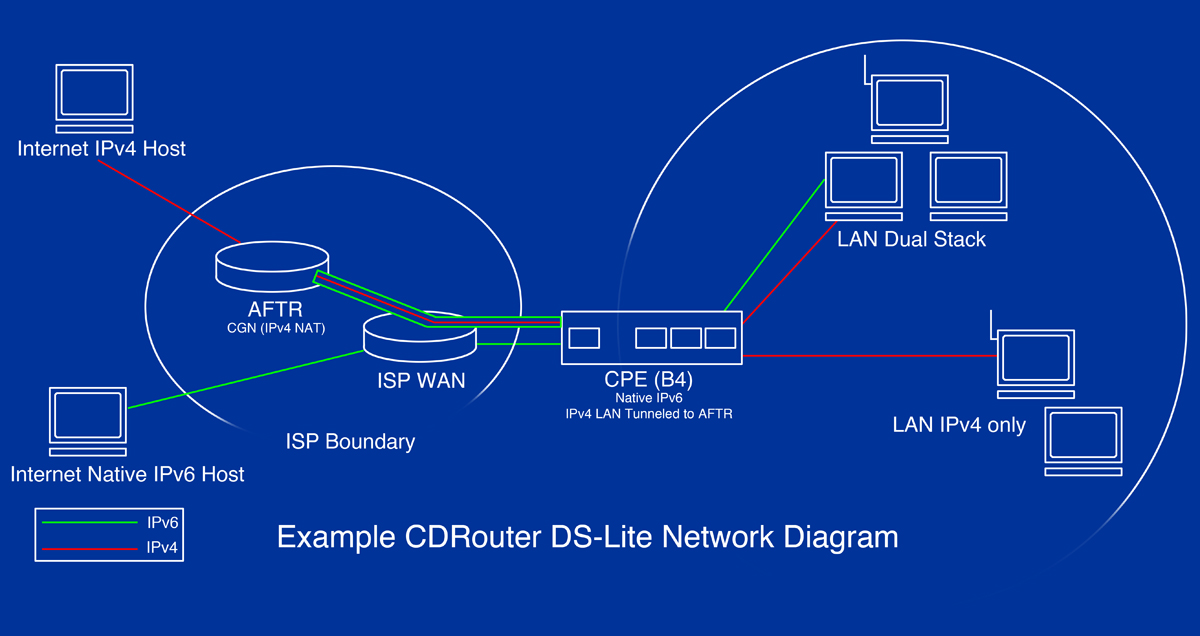
Moving NAT from the CPE to the service provider network avoids double NAT, and lets the service provider share each public IPv4 address among many customers. IPv4-only devices on the LAN continue to work without any configuration changes.
Since the B4 doesn’t perform NAT, it doesn’t have separate WAN and LAN
IPv4 addresses. RFC 6333 reserves the 192.0.0.0/29 network for the
tunnel endpoints. The AFTR uses 192.0.0.1, and the B4 can use any of
the remaining addresses, usually 192.0.0.2.
How CDRouter simulates DS-Lite
When DS-Lite is enabled, CDRouter:
- Brings up the DUT’s native IPv6 WAN connection, using the configured IPv6 WAN mode.
- Doesn’t bring up an IPv4 connection on the WAN. All IPv4 traffic between the DUT and the WAN goes through the DS-Lite tunnel.
- Creates an AFTR on the WAN, which terminates the tunnel and forwards IPv4 traffic to CDRouter’s simulated IPv4 hosts and servers.
- Expects IPv4 packets from the LAN to arrive at the AFTR untranslated, with their original private source addresses.
CDRouter automatically skips tests that aren’t compatible with DS-Lite.
Requirements
DS-Lite requires the CDRouter IPv6 expansion, with IPv6 enabled.
DS-Lite runs over a native IPv6 WAN connection, so
ipv6WanMode must be set to one of the native IPv6 WAN
modes: static, DHCP, autoconf, unnumbered, or PPPoE.
CDRouter creates the AFTR on the primary WAN interface only.
Configuring CDRouter
For a complete configuration, see Example configuration.
Enabling DS-Lite
DS-Lite is an IPv4 WAN mode. To enable it, set wanMode
to dslite:
testvar supportsIPv6  yes
testvar wanMode       dslite
AFTR address
CDRouter creates its AFTR on the WAN at the IPv6 address set by
ipv6DsliteAftr. The AFTR must be on a different IPv6
network prefix than the one used by the DUT’s WAN interface.
testvar ipv6DsliteAftr 3001:aaaa::1
AFTR domain name
The DUT must know the location of the AFTR. Depending on the DUT, it may be configured with the IPv6 address of the AFTR or a domain name, or it may learn the domain name from the DHCPv6 AFTR-Name option (option 64), defined in RFC 6334.
To give the AFTR a domain name, set dhcpv6WanAftrName:
testvar dhcpv6WanAftrName aftr.qacafe.com
When this testvar is set, CDRouter:
- Adds a DNS record so that its DNS servers resolve the name to the
ipv6DsliteAftraddress. - Includes the AFTR-Name option in DHCPv6 replies when the DUT requests it in its Solicit and Request messages.
B4 and AFTR IPv4 addresses
Set wanIspIp to the IPv4 address of the AFTR, and
wanIspAssignIp to the IPv4 address that the DUT’s B4
uses:
testvar wanIspIp        192.0.0.1
testvar wanIspAssignIp  192.0.0.2
testvar wanIspMask      255.255.255.248
CDRouter verifies that clients on the LAN can reach both addresses.
Tunnel endpoint on the DUT
CDRouter’s AFTR sends tunneled traffic to the B4’s IPv6 address. By default, it expects the B4 to use the DUT’s global IPv6 WAN address.
If the DUT has no global IPv6 WAN address, the B4 must use one of the
global IPv6 addresses on its LAN instead. This is the case when
ipv6WanMode is unnumbered, or PPPoE with
ipv6PPPoEAddressMode set to none. In these modes,
CDRouter expects the B4 to use the DUT’s global LAN address, as set by
ipv6LanIp.
If the AFTR receives tunneled packets from a different source address, such as an IPv6 privacy address, it logs a warning and starts using that address as the tunnel endpoint.
B4 firewall behavior
The B4 doesn’t translate IPv4 addresses, but it should still filter
unsolicited IPv4 traffic from the WAN. Set
dsliteFirewallMode to match the DUT’s filtering behavior,
so that CDRouter can adjust the expected results of its tests:
full-cone: The DUT accepts packets from any external host that are sent to an address and port that a LAN client has used.address-restricted(default): The DUT accepts packets only from external hosts that the LAN client has sent packets to.port-restricted: The DUT accepts packets only from the external host address and port that the LAN client has sent packets to.
testvar dsliteFirewallMode address-restricted
IPv4-only LAN
Some DS-Lite CPEs provide only IPv4 service on their LAN. To test these
devices, set ipv6LanMode to none. CDRouter then
doesn’t try to get global IPv6 addresses for its LAN clients during
startup.
testvar ipv6LanMode none
Example configuration
In this example, the DUT uses DHCPv6 to get its global IPv6 WAN address
(3001::2) and a delegated prefix (3001:dddd::/48) for its LAN.
CDRouter’s AFTR has the IPv6 address 3001:aaaa::1 and the domain name
aftr.qacafe.com, which it provides to the DUT in the DHCPv6 AFTR-Name
option.
The DUT advertises the 3001:dddd:0:1::/64 prefix on its LAN, and
assigns itself an EUI-64 address from that prefix. Its B4 uses the IPv4
address 192.0.0.2.
# -- IPv4 WAN configuration
testvar wanMode                   dslite
testvar wanIspIp                  192.0.0.1
testvar wanIspAssignIp            192.0.0.2
testvar wanIspMask                255.255.255.248

# -- IPv6 WAN configuration
testvar supportsIPv6              yes
testvar ipv6WanMode               DHCP
testvar ipv6WanIspIp              3001::1
testvar ipv6WanIspAssignIp        3001::2
testvar ipv6WanIspPrefixLen       64

# -- DHCPv6 prefix delegation (enabled by default in DHCP mode)
testvar dhcpv6WanAssignPrefix     3001:dddd::
testvar dhcpv6WanAssignPrefixLen  48

# -- DS-Lite configuration
testvar ipv6DsliteAftr            3001:aaaa::1
testvar dhcpv6WanAftrName         aftr.qacafe.com
testvar dsliteFirewallMode        address-restricted

# -- IPv6 LAN configuration
testvar ipv6LanMode               autoconf
testvar ipv6LanIp                 ::%eui64%
testvar ipv6LanSubnetId           1
To use a different IPv6 WAN mode, change ipv6WanMode
and the related testvars as described in
Native IPv6 Testing with CDRouter.
The DS-Lite testvars stay the same.
DS-Lite test module
The dslite test module verifies the DUT’s B4 functionality, including:
- NAT is disabled on the B4.
- The B4 announces itself as the IPv4 default gateway and DNS server to LAN clients using DHCPv4.
- DNS queries sent to the B4 over IPv4 are forwarded to the IPv6 DNS server.
- Large IPv4 packets are fragmented at the IPv6 layer, and IPv4 packets with the Don’t Fragment bit set are handled correctly.
- LAN clients can reach the IPv4 addresses of the B4 and the AFTR.
- The IPv4 Type of Service field is copied to the IPv6 Traffic Class field.
Testing exercises
Most of CDRouter’s IPv4 and IPv6 test modules also run with DS-Lite enabled. Running all of the applicable test modules is a good way to check the DUT’s B4 implementation for problems caused by the change in the NAT model, by MTU and fragmentation issues from the tunnel encapsulation, or at the application layer. For more information on MTU issues, see IPv6 MTU concepts in CDRouter.
It’s also a good idea to verify that the DUT’s DS-Lite and IPv4 behavior is consistent across all of the IPv6 WAN modes that it supports. To do this, create a config for each IPv6 WAN mode and run the same tests with each one.
CDRouter doesn’t currently support Performance testing over DS-Lite configurations.
