CSS Variable Reference
The following CSS Variables can be modified to affect the style of the Packet Viewer components.
Borders
| Variable | Default Value | Dark Mode |
|---|---|---|
--pv-border-color |
#d5d5d5 | #666666 |
--pv-border |
1px solid var(--pv-border-color) |
|
--pv-border-radius |
8px | |
--pv-decode-tab-border |
1px solid #ccc |
Colors
| Variable | Default Value | Dark Mode |
|---|---|---|
--pv-color-error |
#ff0000 | #b73030 |
--pv-color-disabled |
#b3b3b3 | #5c6b7a |
--pv-color-hover |
#edf5fe | #3c4d60 |
--pv-color-primary |
#6ba2e5 | #6ba2e5 |
--pv-color-success |
#c0f2c0 | #48a860 |
Filter Bar
| Variable | Default Value | Dark Mode |
|---|---|---|
--pv-filter-bar-alignment |
flex-end | |
--pv-filter-bar-width |
50% | |
--pv-filter-suggest-height |
20rem | |
--pv-filter-suggest-width |
15rem | |
--pv-invalid-display-filter-color |
#f2c0c0 | #801a1a |
--pv-valid-display-filter-color |
#c0f2c0 | #2e4d2e |
--pv-navchart-overlay-mode |
multiply | screen |
Follow-Stream Colors
| Variable | Default Value | Dark Mode |
|---|---|---|
--pv-follow-stream-client-bg |
#fbeded | #281414 |
--pv-follow-stream-client-fg |
#870e0e | #ffaaaa |
--pv-follow-stream-server-bg |
#ededfb | #141428 |
--pv-follow-stream-server-fg |
#00007f | #aaaaff |
Spacing
| Variable | Default Value |
|---|---|
--pv-gap-small |
0.5rem; |
--pv-gap-medium |
1.5rem; |
--pv-padding-small |
0.25rem; |
--pv-padding-normal |
1rem; |
Packet List
| Variable | Default Value | Dark Mode |
|---|---|---|
--pv-packet-list-header-height |
30px | |
--pv-packet-list-header-resize-height |
50% | |
--pv-packet-list-header-resize-width |
1px | |
--pv-packet-list-row-border-style |
none | |
--pv-handle-width |
0.25rem | |
--pv-selected-packet-bg |
#a5cdff | #365980 |
--pv-selected-packet-fg |
#ffffff | #e0e0e0 |
--pv-packet-list-css-filter |
brightness(85%) |
UI Elements
| Variable | Default Value | Dark Mode |
|---|---|---|
--pv-ui-bg |
#ffffff | #000000 |
--pv-ui-border |
1px solid var(--pv-border-color) |
|
--pv-ui-border-radius |
0.25rem | |
--pv-ui-color |
#333333 | |
--pv-status-bar-bg |
var(--pv-ui-bg) |
|
--pv-ui-secondary-bg |
#eeeeee | #2a2a2a |
--pv-ui-secondary-color |
#666666 | #b4b4b4 |
--pv-odd-row-color |
#f1f1f1 | #151515 |
--pv-table-scroll-bar-theme |
light | dark |
--pv-ladder-arrow-color |
#aaa | #888 |
--pv-ladder-arrow-color-hover |
#333 | #ccc |
--pv-box-shadow-color |
rgba(0, 0, 0, 0.1) | rgba(0, 0, 0, 0.5) |
Fonts
| Variable | Default Value |
|---|---|
--pv-ui-font |
Inter, system-ui, ‘Segoe UI’, Roboto, Helvetica, Arial, sans-serif, ‘Apple Color Emoji’, ‘Segoe UI Emoji’ |
--pv-ui-line-height |
1.25em |
--pv-ui-font-normal |
0.875rem; |
--pv-ui-font-small |
0.75rem |
--pv-data-font-family |
‘Roboto Mono’, monospace; |
--pv-data-font-size |
0.75rem; |
--pv-data-line-height |
1rem; |
--pv-stack-trace-font-size |
90% |
Appearance
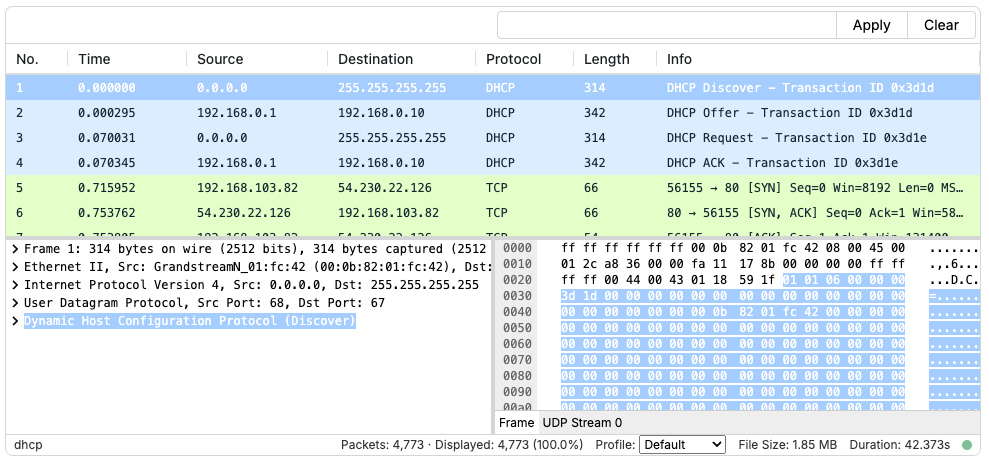
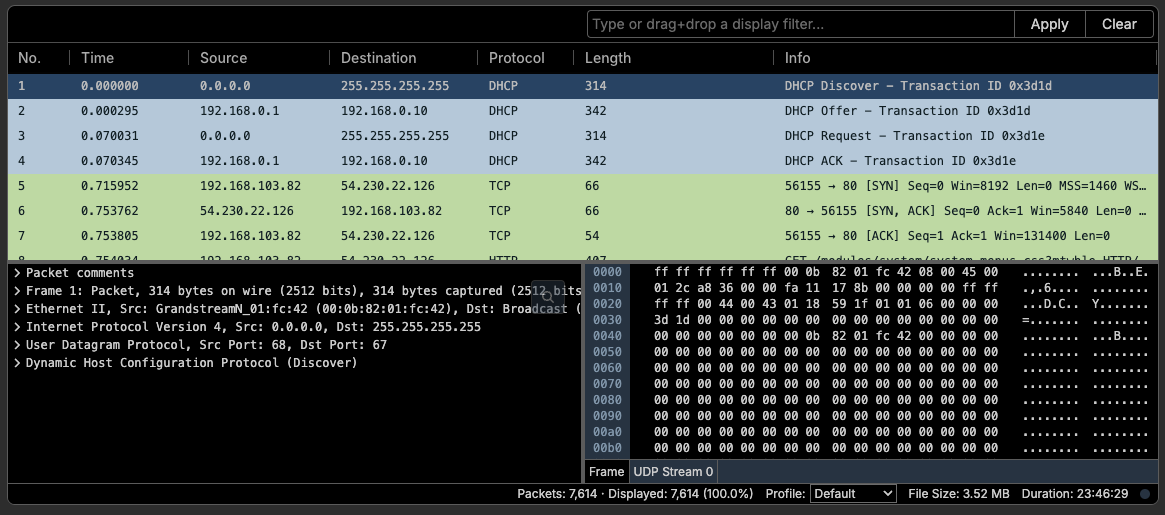
PacketViewer supports light and dark themes. Theme selection affects the overall interface styling while preserving packet color schemes for consistency with Wireshark profiles.
Light Mode (Default)
Dark Mode
PacketViewer v1.15.0 introduces dark mode support for the main PacketViewer
component.
Enabling DarkMode
Note: Dark mode support is currently limited to the main PacketViewer
component. Other Analysis Views and individual components do not yet support
dark mode theming.
To enable dark mode, set the data-theme attribute on the document element:
// Enable dark mode
document.documentElement.setAttribute("data-theme", "dark");

// Return to light mode
document.documentElement.setAttribute("data-theme", "light");
// or
document.documentElement.removeAttribute("data-theme");
Profile Colors
Dark mode preserves the packet color scheme defined by Wireshark profiles to maintain consistency with familiar analysis workflows. Instead of replacing these colors entirely, the interface dims them appropriately for dark backgrounds while keeping the visual distinctions between different packet types intact.
