Analysis Views
The @qacafe/pv-react/views module exports components for analyzing and
visualizing network packet data at a higher level than the packet decode list.
All Analysis Views share the same IStandaloneProps interface,
allowing for consistent usage across different visualizations.
Note: When importing any Analysis Views, you must also have the primary
style.css CSS stylesheet imported as well.
Common Usage
Here’s an example of how to use any of the View components:
import React from "react";
import { AnyViewComponent } from "@qacafe/pv-react/views";
import "@qacafe/pv-react/style.css";

function PacketAnalysis() {
  return (
    <AnyViewComponent
      file="capture.pcap"
      endpoint="/api"
      profile=""
      filter="tcp.port == 80"
      onError={(error, info) => console.error("View error:", error, info)}
    />
  );
}
In this example, AnyViewComponent can be replaced with any of the specific
View components exported from this module, such as ConversationsTableView,
PacketSequenceView, etc. The props shown are common to all View components,
but each may have additional specific props or behaviors.
Key props include:
file: The PCAP file to analyzeprofile: The analysis profile to usefilter: A display filter for the dataendpoint: The API endpoint to communicate withonError: Error handling callback
You can find working examples of these View components in the Storybook distributed with Packet Viewer.
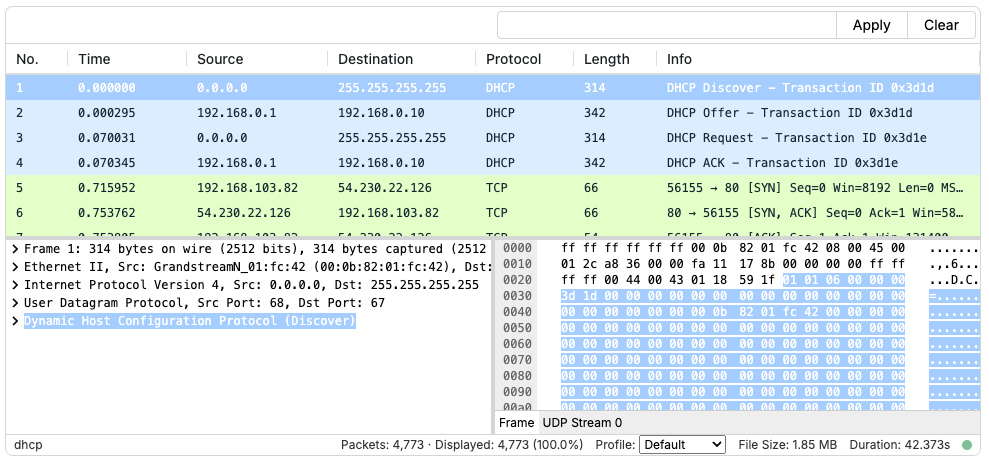
PacketViewer
The classic “Wireshark” view providing a Packet List, Decode Tree, Hex Dumps and Follow Streams, all controlled by a Display Filter input box.
import { PacketViewer } from "@qacafe/pv-react";
Analyst View
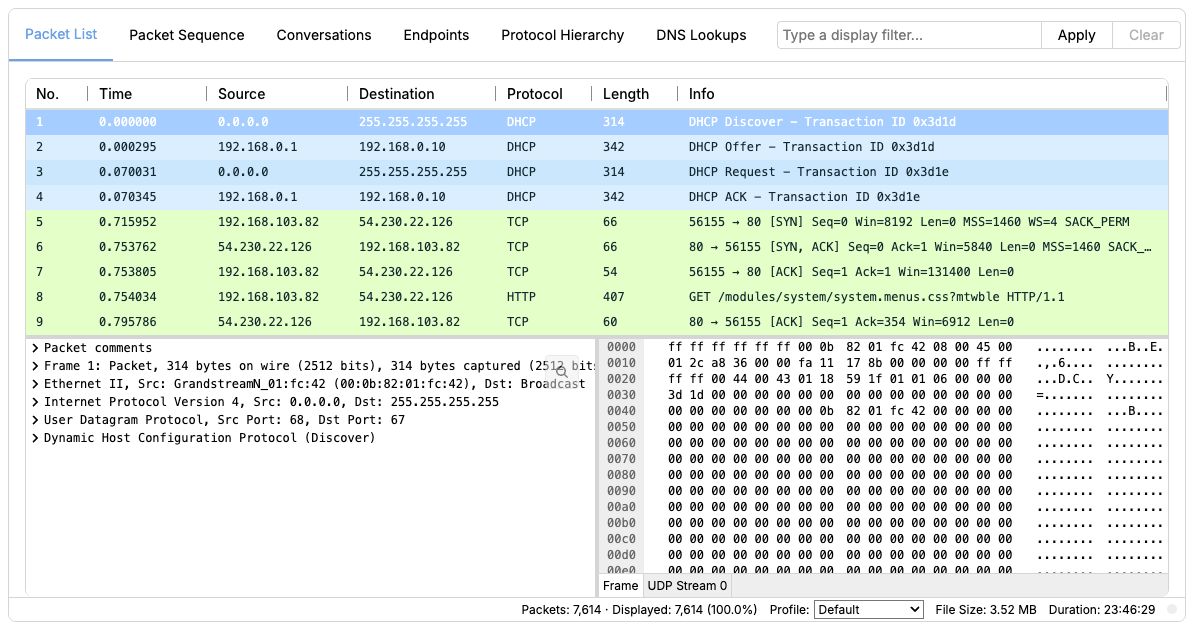
A single component that brings together a curated set of analysis tools, all wired to a shared display filter. Packet List, Ladder Diagrams, Conversations, Endpoints, Protocol Hierarchy, and DNS all respond to the same filter at the same time, with no additional wiring required. Clicking a row in any tab also navigates the packet list to the matching packet or conversation.
import { AnalystView } from "@qacafe/pv-react/views";
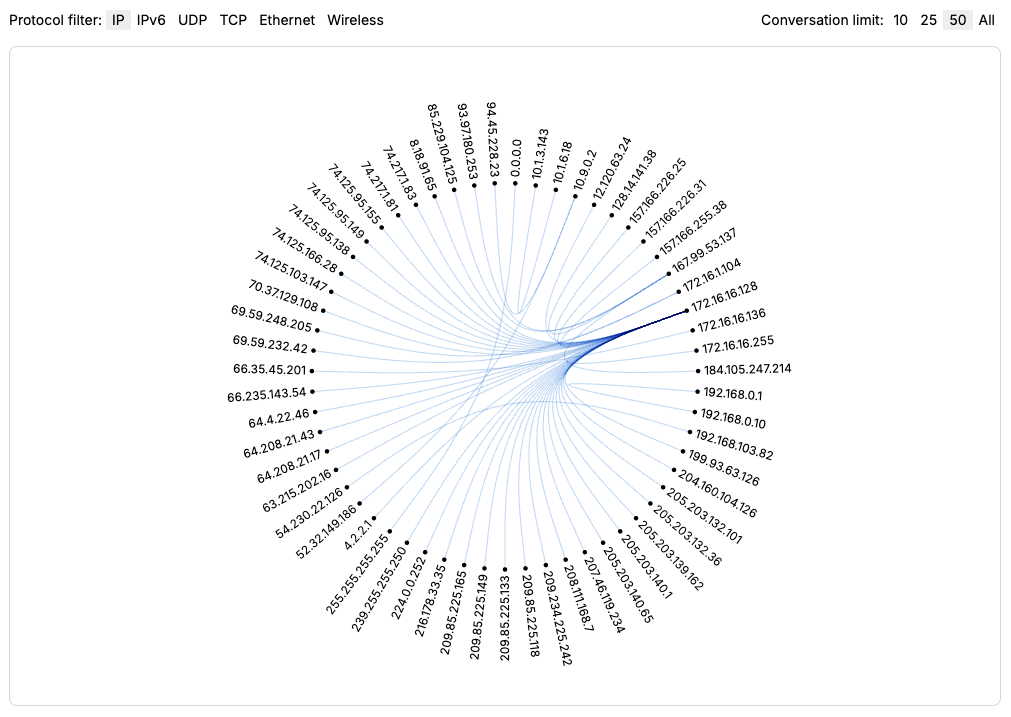
Conversation Graph
An interactive D3-powered network map that shows host-to-host traffic as a node graph. Each host appears as a node, with edges connecting any two hosts that exchanged traffic. Edge weight reflects traffic volume.
Supports zoom and drag-and-drop. Clicking a node or edge applies a display filter scoped to that traffic. Also available as a tab in the Analyst View.
Introduced in 2026.04.
import { ConversationGraphView } from "@qacafe/pv-react/views";
Additional Props:
onClick?: (filter: string) => void- Called when a node or edge is clicked, with a display filter scoped to that traffic
TCP Stream Graph (Stevens)
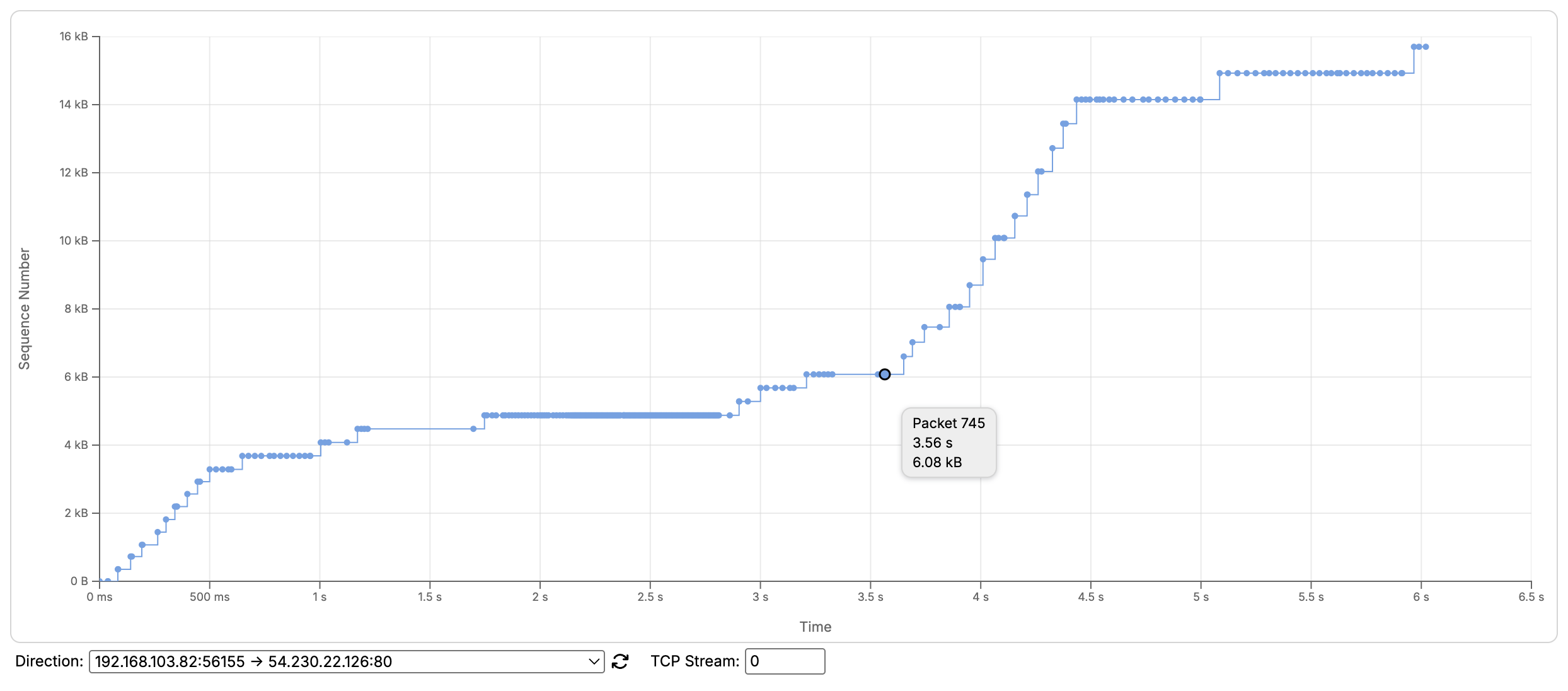
A time/sequence graph that plots the sequence number of each packet against capture time for a single TCP stream. In a healthy transfer, sequence numbers climb steadily in a staircase pattern; a flat stretch means no new data was sent, and a cluster of points at the same sequence number indicates retransmissions. Modeled on Wireshark’s TCP Stream Graphs.
The graph is zoomable, and hovering over a point shows its packet number, timestamp, and sequence number. The TCP stream and direction are selectable below the graph.
Introduced in 2026.06.
import { StevensGraphView } from "@qacafe/pv-react/views";
Additional Props:
stream: number- The initialtcp.streamindex to graphreverse?: boolean- Start on the reverse direction (opposite the first packet seen)
TCP Stream Graph (Throughput)
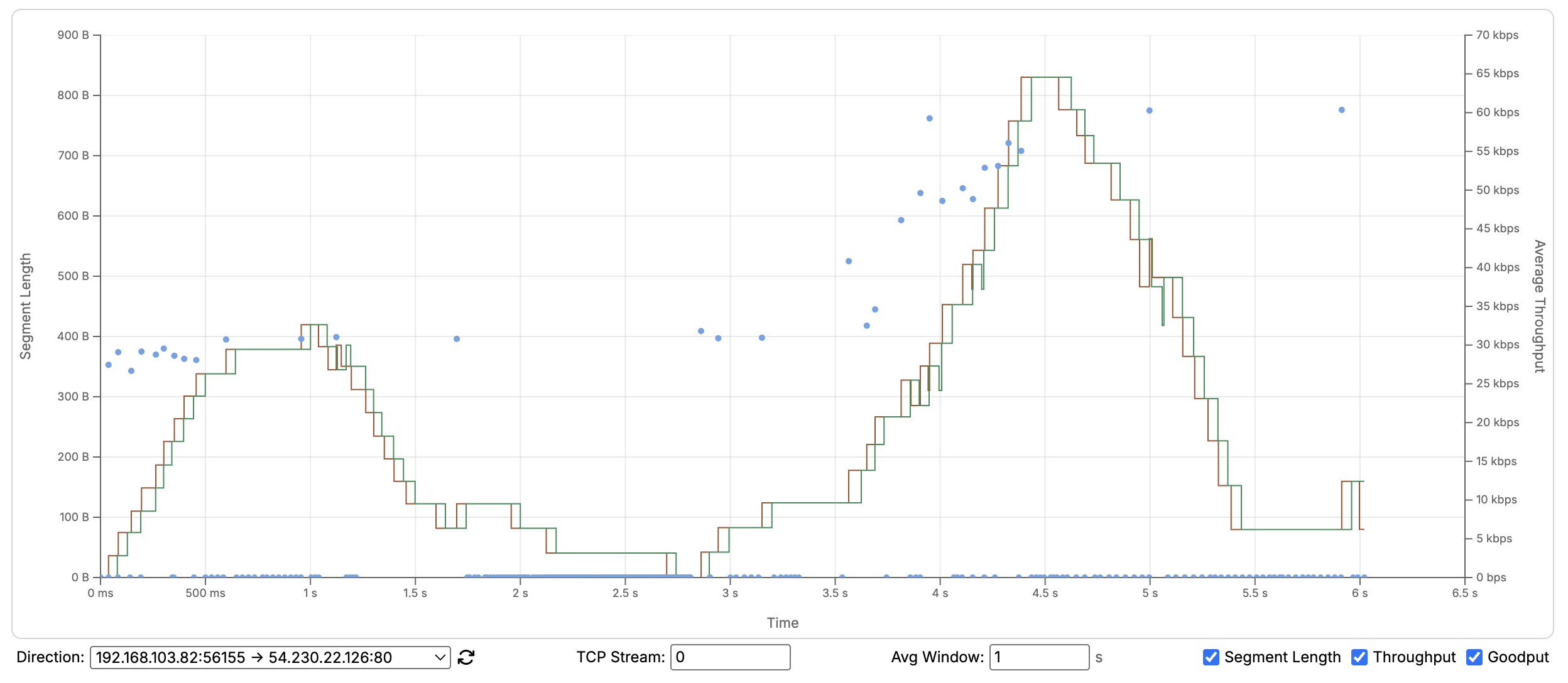
A graph that overlays three series for a single TCP stream: each segment’s payload length as scattered points (left axis), and windowed throughput and goodput as step lines (right axis, in bits/s). Throughput counts all bytes sent including retransmissions; goodput counts only the bytes that advance the stream, so when goodput drops below throughput, retransmissions are eating into useful bandwidth. Modeled on Wireshark’s TCP Stream Graphs.
The averaging window defaults to 1 second and is adjustable: a wider window smooths the lines, a narrower one reveals finer variation. The graph is zoomable, each series can be toggled on or off independently, and the TCP stream and direction are selectable below the graph.
Introduced in 2026.06.
import { ThroughputGraphView } from "@qacafe/pv-react/views";
Additional Props:
stream: number- The initialtcp.streamindex to graphreverse?: boolean- Start on the reverse direction (opposite the first packet seen)
TCP Stream Graph (tcptrace)
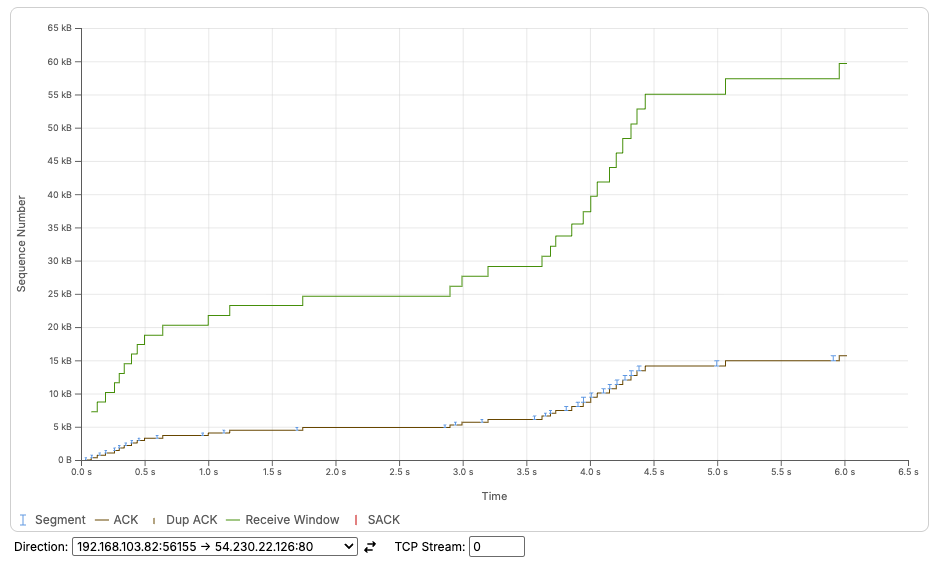
A time/sequence graph that draws both halves of a TCP stream’s flow control. Every segment the sender put on the wire is a vertical bar covering the sequence range it carried, with the receiver’s acknowledgement line running below the bars and its advertised receive window above them. The gap between those two lines is the room the sender has left, so bars pressed up against the window line mean a transfer that is window-limited rather than slow, and a window line sagging down to meet the acknowledgement line is a receiver that has stopped draining its buffer. Modeled on Wireshark’s TCP Stream Graphs.
Where the Stevens graph shows what the sender sent, this view adds what the receiver did about it, which puts the detail that usually costs a trip through the packet list on the plot itself. A retransmission is a bar that steps backwards, below sequence numbers already sent. Duplicate ACKs tick along the acknowledgement line, and selective acknowledgements show which ranges above a gap did arrive, which is the difference between one lost segment and a collapse. A closed window has no marker of its own: the window line meeting the acknowledgement line is the whole event.
The graph is zoomable and can be dragged to pan. Hovering over a segment shows its packet number, timestamp, and the sequence range it carried, and the TCP stream and direction are selectable below the graph.
Introduced in 2026.08.
import { TcptraceGraphView } from "@qacafe/pv-react/views";
Additional Props:
stream: number- The initialtcp.streamindex to graphreverse?: boolean- Start on the reverse direction (opposite the first packet seen)showLegend?: boolean- Add a legend between the plot and the controls (defaulttrue)
Conversations Table
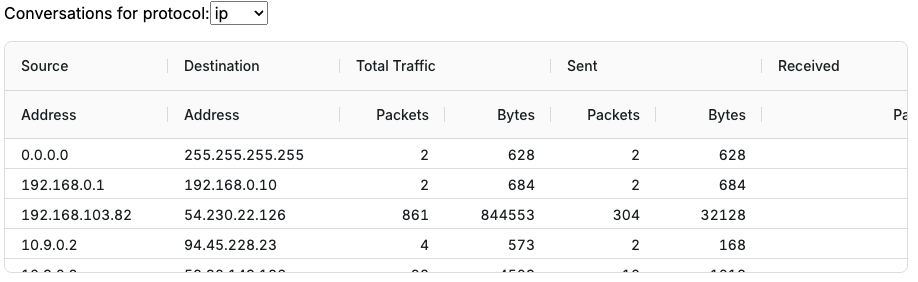
A component that displays a table of network conversations for various protocols, showing source and destination addresses, and other relevant conversation data.
import { ConversationsTableView } from "@qacafe/pv-react/views";
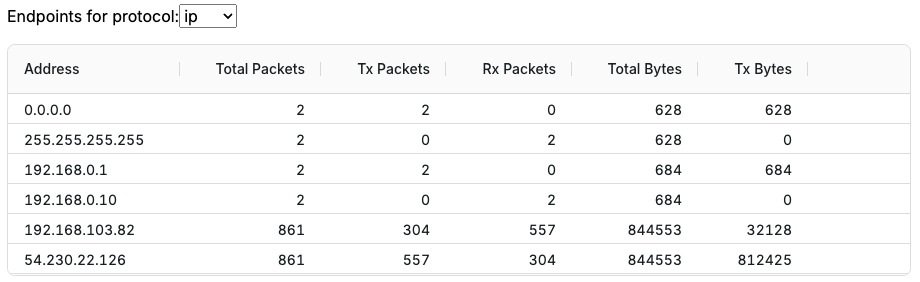
Endpoints Table
A component that presents a table of network endpoints, including IP addresses, ports, GeoIP information and related statistics for each endpoint involved in the captured traffic. To display GeoIP information in this table, install GeoIP databases.
import { EndpointsTableView } from "@qacafe/pv-react/views";
Sequence Diagram (Ladder)
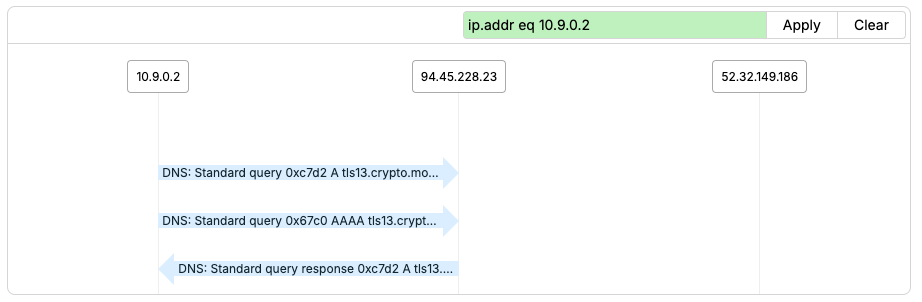
A component that visualizes the sequence of packets in a capture, in a time-based vertical format, useful for understanding the flow of communication between endpoints. Clicking on ladder arrows expands PacketTree views below each packet for detailed analysis.
import { PacketSequenceView } from "@qacafe/pv-react/views";
Additional Props:
alwaysExpanded?: boolean- Shows all PacketTrees expanded by defaultdisablePacketTree?: boolean- Disables the PacketTree functionality when not neededenableNavChart?: boolean- Adds NavChart component for time-based filtering alongside display filtersquickLoad?: boolean- Loads only the first 5000 packets initially for faster display with large files
To customize how packet data is displayed in the ladder diagram (such as using different field names or custom formatting), see the Custom Ladder Diagrams documentation.
Protocol Sequence View
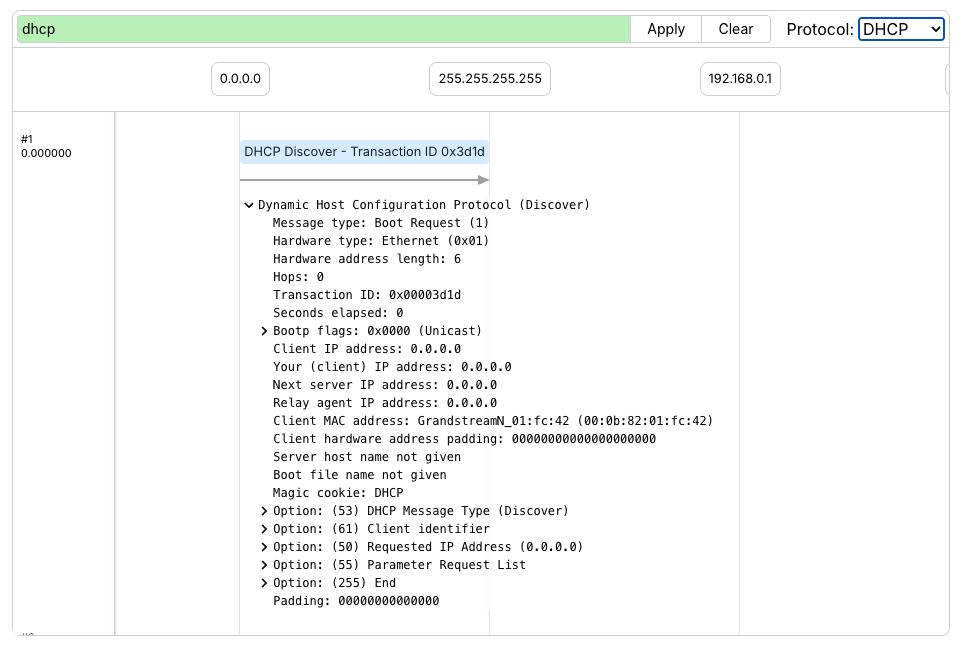
The Protocol Sequence Views show a ladder diagram for a specific protocol with only the protocol’s specific PacketTree branch displayed under every packet. If the protocol is blank, this view behaves like the PacketSequenceView where the arrows can be clicked to be expanded.
Preset protocols are provided in a select box making it easy to isolate common protocols like DHCP, DNS, HTTP, and SIP.
Additional protocols must exist at the top-level of the PacketTree to be displayed. Nested protocols are not supported.
import { ProtocolSequenceView } from "@qacafe/pv-react/views";
Additional Props:
quickLoad?: boolean- Loads only the first 5000 packets initially for faster display with large filesenableNavChart?: boolean- Adds NavChart component for time-based filtering alongside display filtersprotocol?: string- A protocol field name from Wireshark to filter the ladder on and show the sub-tree from. Common values:'dhcp','dhcpv6','dns','sip','http'hideProtocolPicker?: boolean- Hides the protocol picker select box from the viewhideFilterInput?: boolean- Hides the filter input barclassName?: string- CSS class name to apply to the child
Packet Tree
A component that displays packet data in a tree structure, allowing users to explore the hierarchical nature of network protocols within each packet.
import { PacketTreeView } from "@qacafe/pv-react/views";
Packet Tree with Decode
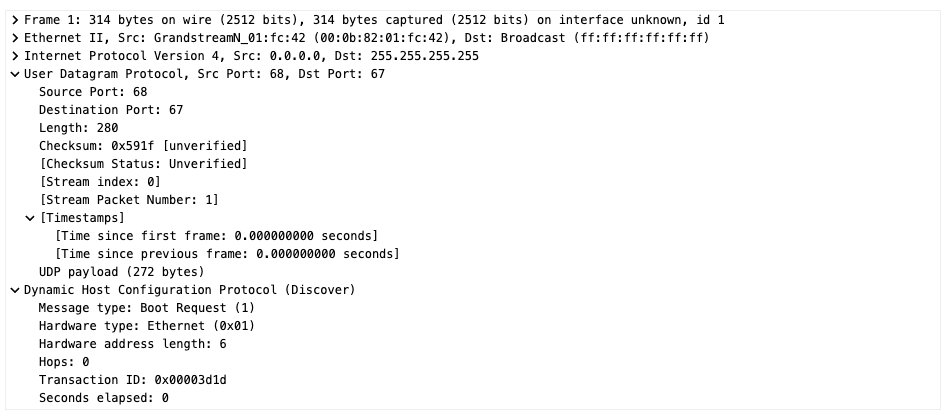
A component that provides a detailed, hierarchical view of a decoded packet, showing protocol layers and fields in a tree structure for in-depth packet analysis, as well as the ASCII dump of the raw packet.
import { PacketTreeDecodeView } from "@qacafe/pv-react/views";
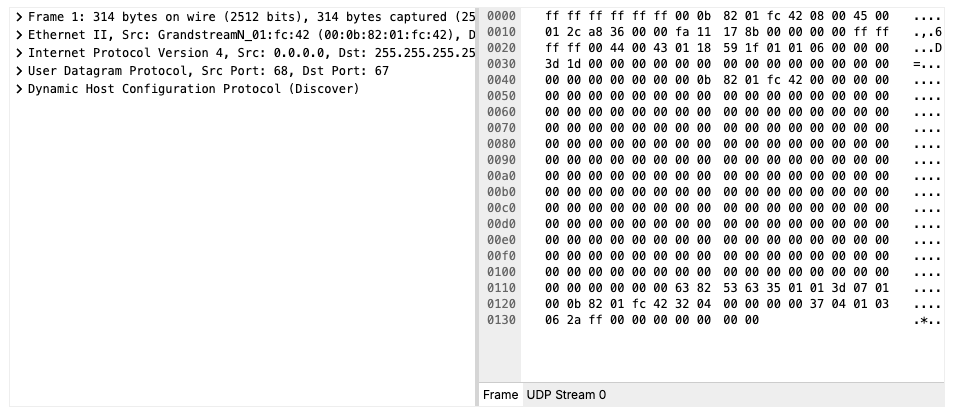
Tree Interactions
The packet tree in both PacketTreeView and PacketTreeDecodeView supports a
few interactions beyond clicking to expand or collapse a single node:
- Copy text: Hold
Command(macOS) orControl(Windows/Linux) while interacting with the tree to switch it into copy/paste mode, allowing the decoded text to be selected and copied. - Expand or collapse all:
Option-click a node’s caret to expand or collapse its entire subtree, rather than just that node. - Search auto-expand: Searching the tree automatically expands nodes as needed to reveal each match.
Character Encoding
The character column of a hex dump renders each byte as its ASCII character by default. Captures from mainframe environments carry EBCDIC-encoded text, which is mostly non-printable when read as ASCII.
Setting enableCharEncoding adds an encoding picker to the decode pane’s tab
bar, showing the encoding currently in use. Switching it to EBCDIC re-renders
the character column, and the choice applies to every text view in the pane,
including the stream tabs. It persists as new packets are selected. Without the
prop the picker does not render and the views read bytes as ASCII.
The prop is available on PacketTreeDecodeView, PacketViewer, AnalystView,
and FollowStreamView. When composing components directly, the HexDump and
AsciiDump components accept an encoding prop of type CharEncoding
('ascii' or 'ebcdic').
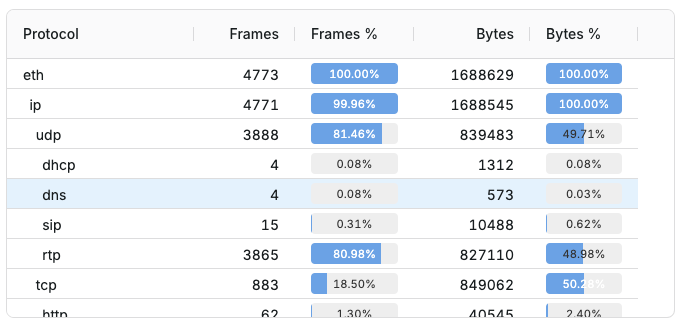
Protocol Hierarchy Table
A component that shows a table representing the hierarchy of protocols present in the captured network traffic, typically including statistics like packet counts and percentages for each protocol.
import { ProtocolHierarchyTableView } from "@qacafe/pv-react/views";
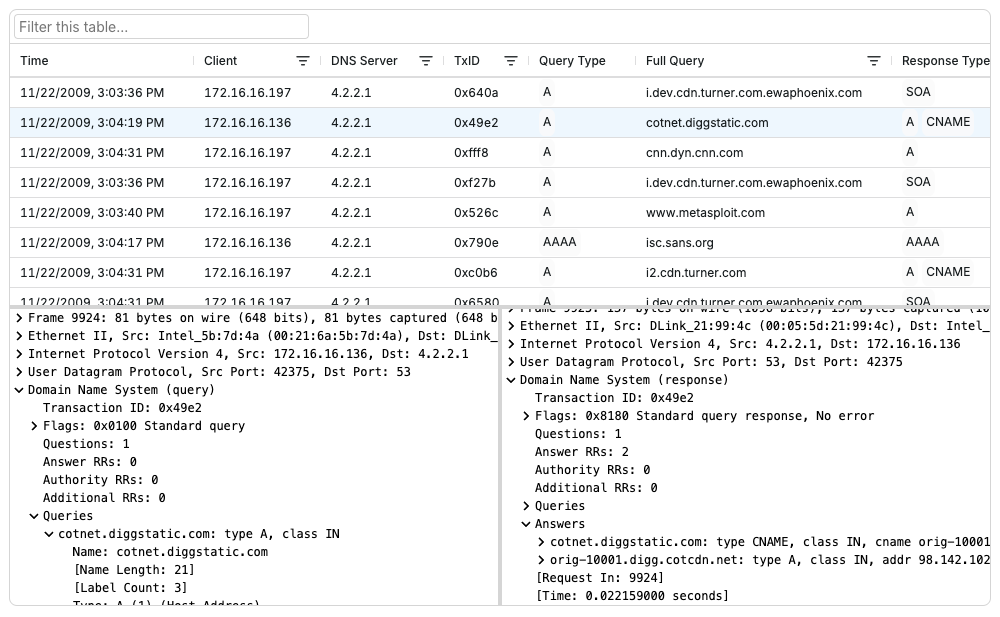
DNS Lookups Table (PacketTrees)
A component that provides detailed analysis of DNS query-response activity in a capture, showing query types, response times, and name resolution results. The table tracks DNS transactions between clients and servers, making it easy to identify name resolution patterns and potential DNS issues.
The split-panels below the table show the packets containing the DNS query and response.
import { DNSLookupsTableTree } from "@qacafe/pv-react/views";
DNS Lookups Table
The same table as above, but without the Packet Tree panels.
import { DNSLookupsTableView } from "@qacafe/pv-react/views";
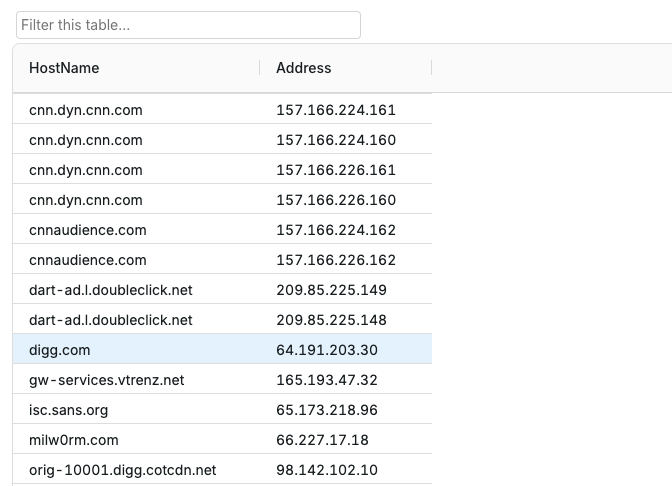
Resolved Hosts Table
A component that displays all host-to-IP address mappings discovered through name resolution found in the capture.
import { ResolvedHostsTableView } from "@qacafe/pv-react/views";
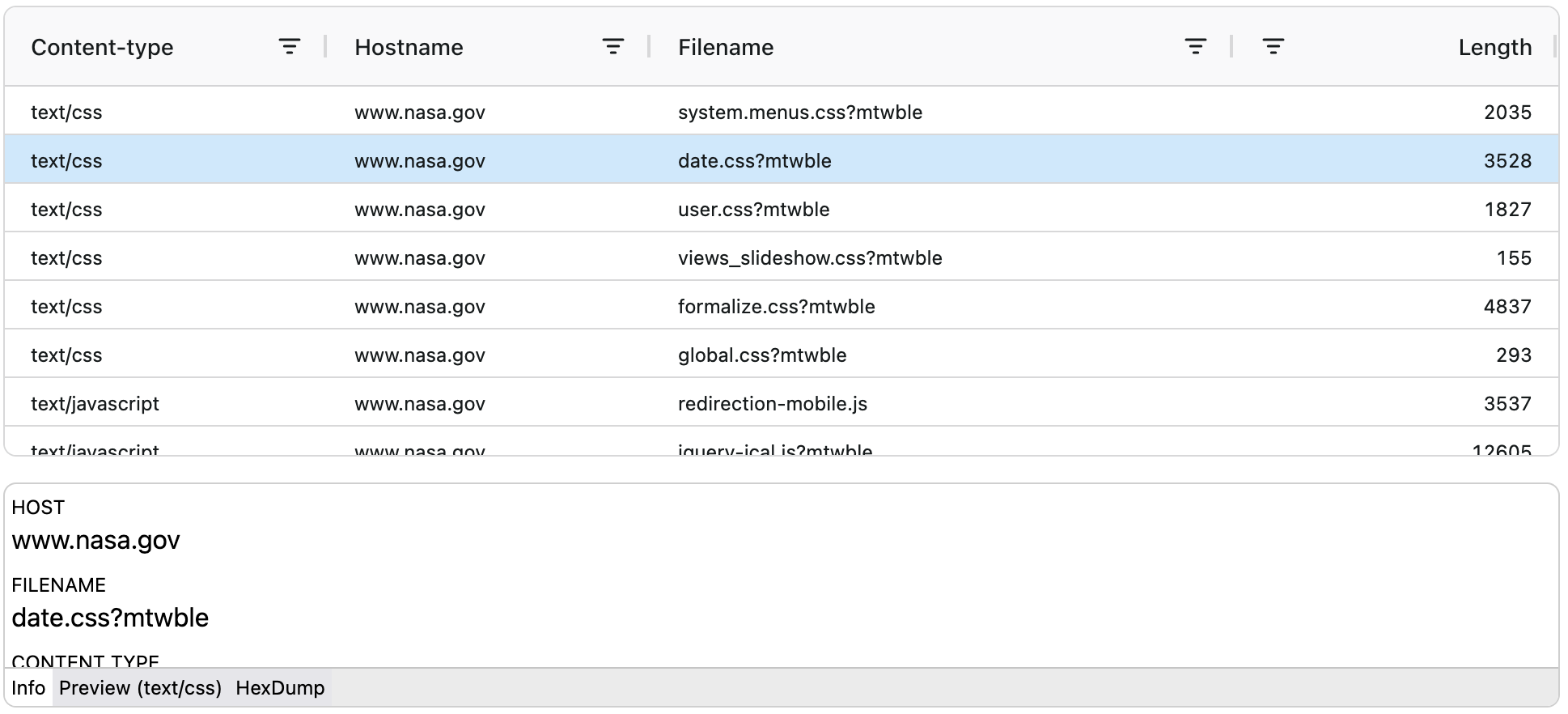
HTTP Object Explorer Table
A component that displays HTTP request objects
import { HTTPObjectExplorerView } from "@qacafe/pv-react/views";
HTTP Requests Table
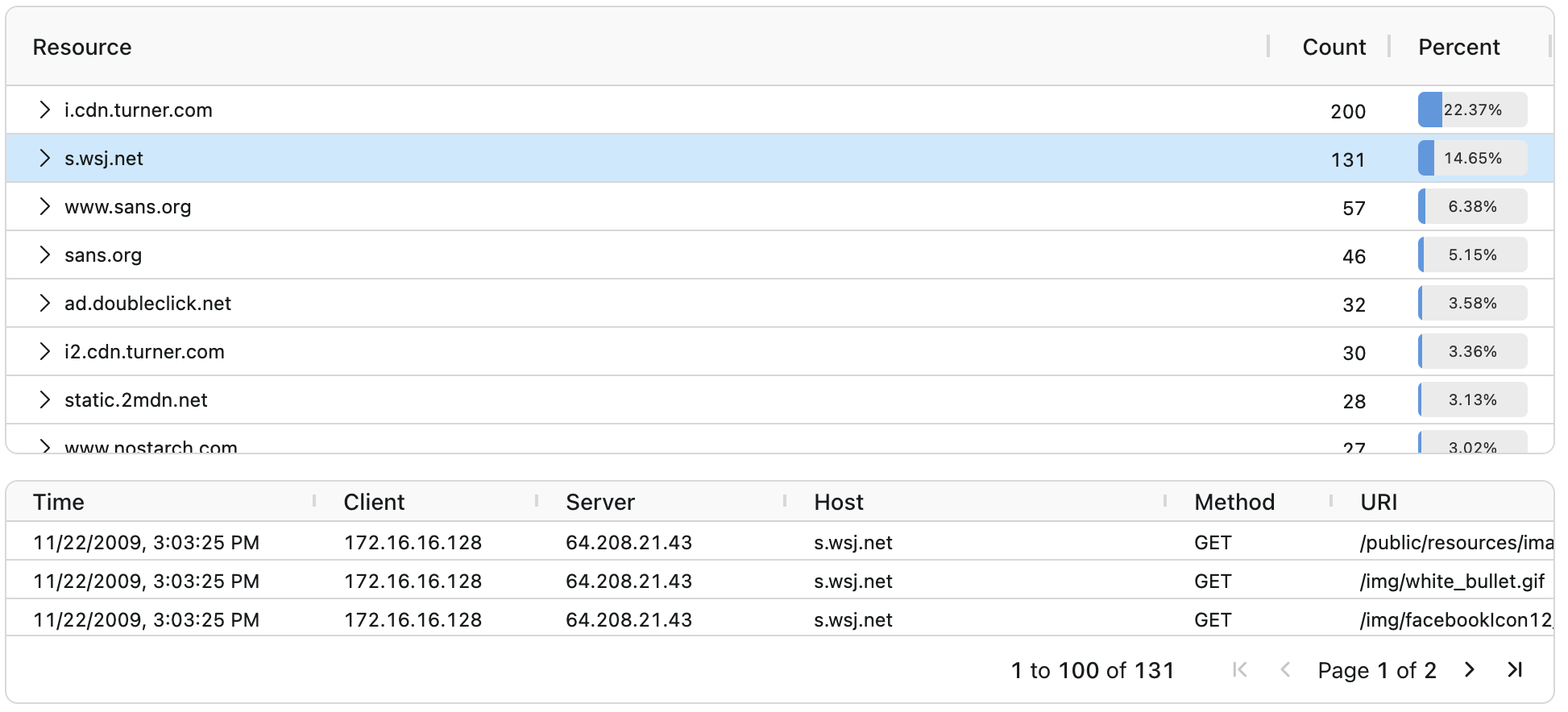
A component that displays total counts for HTTP requests and displays the individual requests to view.
import { HTTPRequestsView } from "@qacafe/pv-react/views";
GeoIP Map
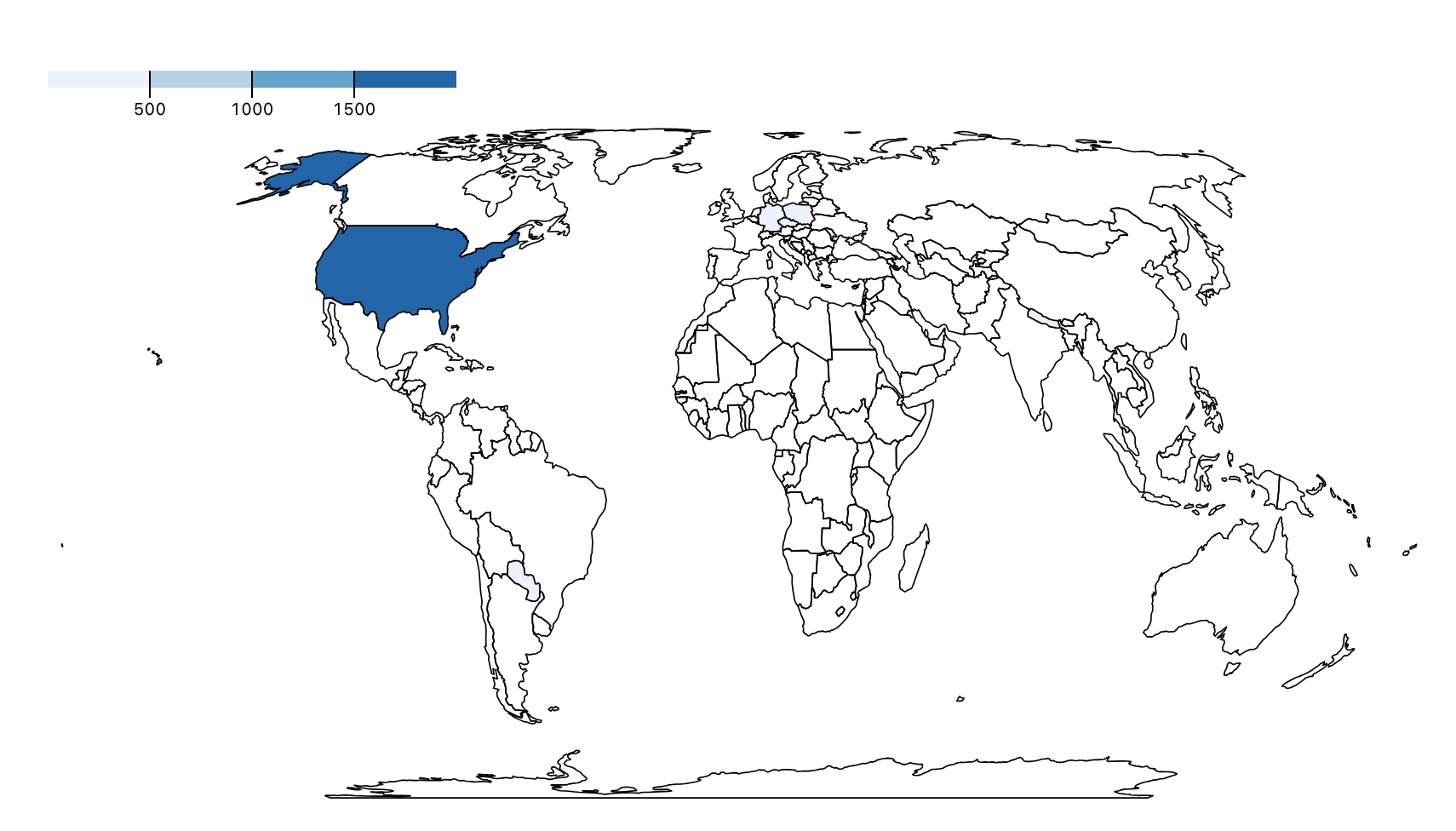
Displays a map of the countries where endpoints of a capture are based. This view requires installing GeoIP databases.
import { GeoIPView } from "@qacafe/pv-react/views";
SIP Statistics
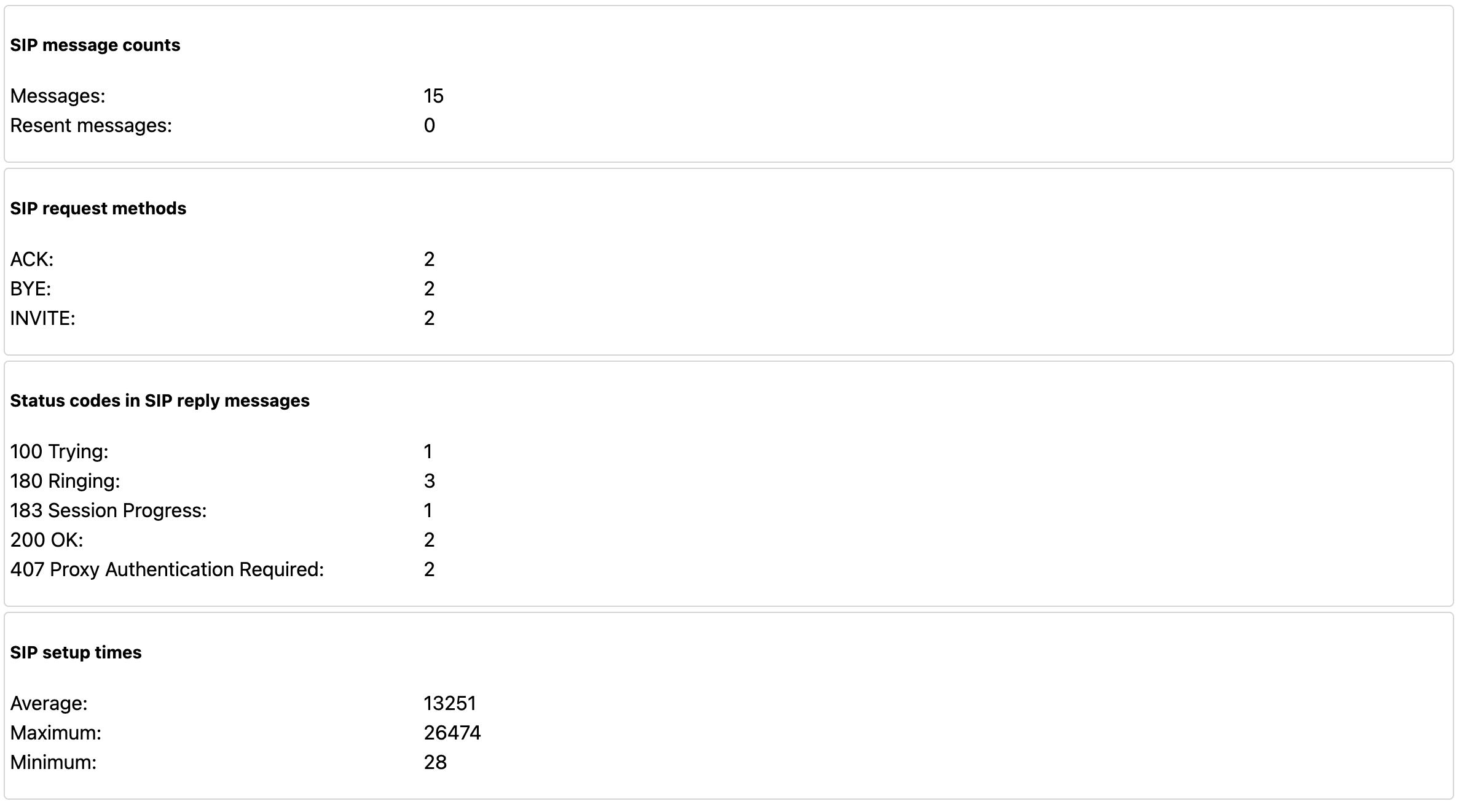
Displays aggregate information regarding SIP packets
import { SIPStatisticsView } from "@qacafe/pv-react/views";
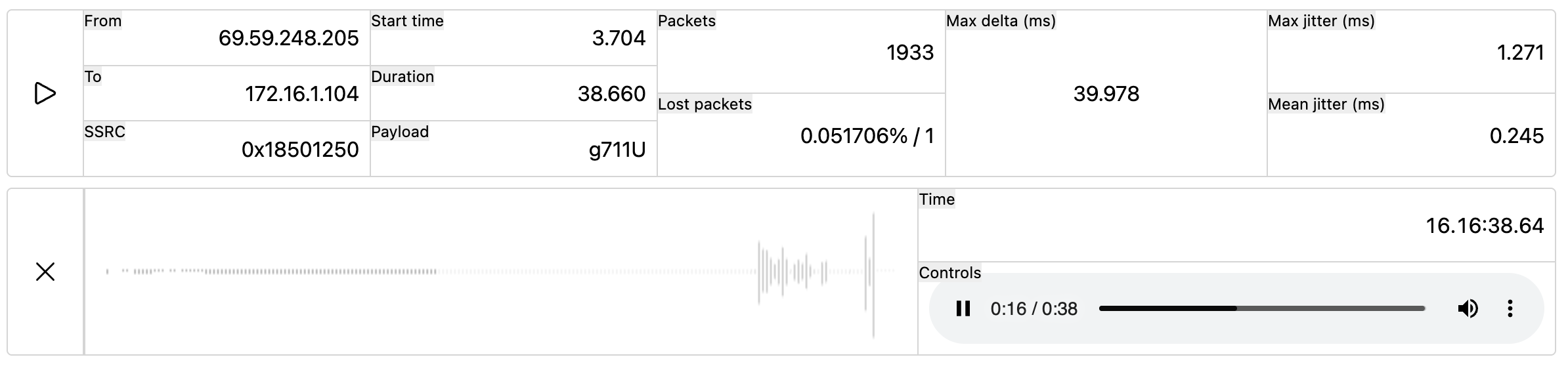
RTP Stream Playback
Displays a modified table of RTP stream data. With the ability to play the audio of each audio stream.
import { RTPStreamListView } from "@qacafe/pv-react/views";
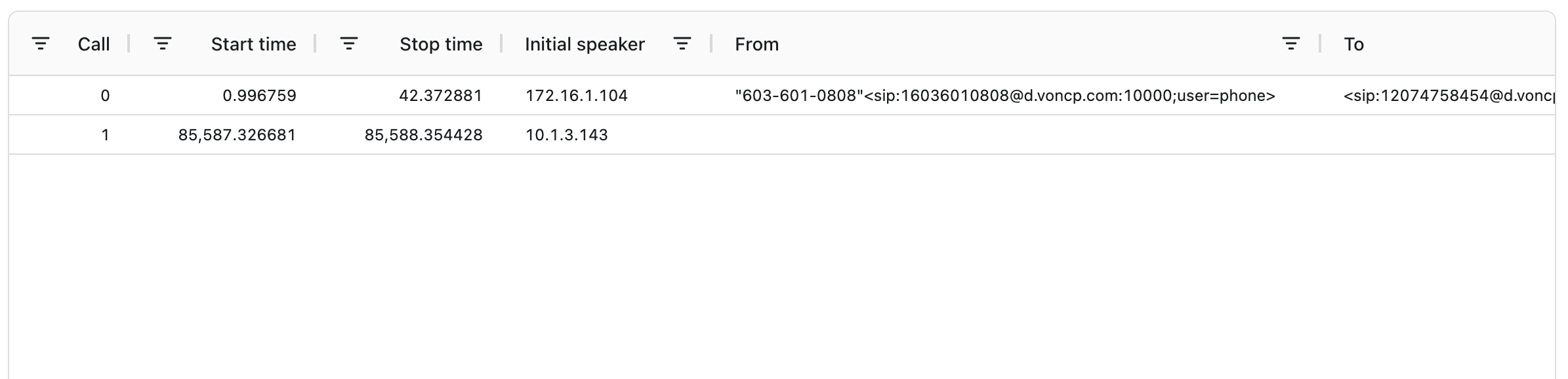
VoIP Call List
Displays a table of VoIP packets.
import { VoIPCallsTableView } from "@qacafe/pv-react/views";
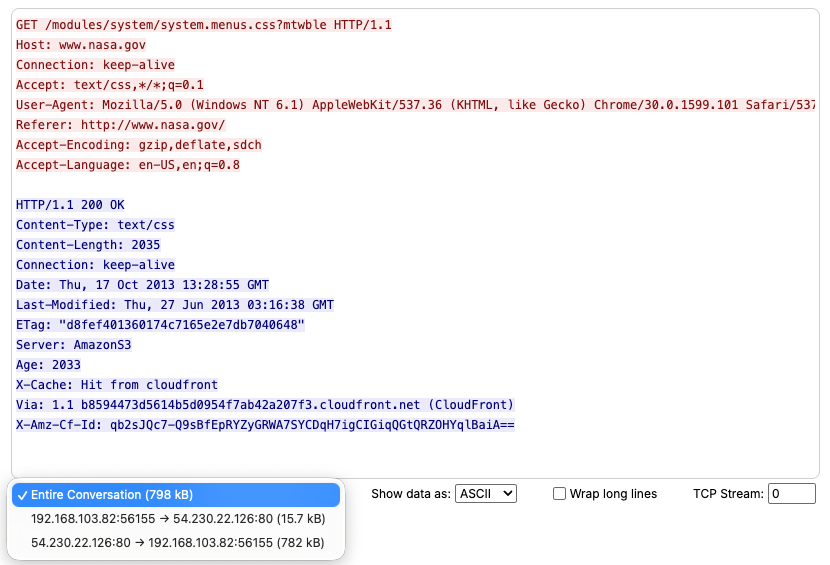
Follow Stream
A dedicated view for analyzing application layer data from TCP, UDP, HTTP, TLS, and other protocol streams. The Follow Stream view provides flexible visualization options including easy navigation between different streams of the same protocol, the ability to show the entire conversation or filter to a single direction, toggle between text and hex dump display formats, and control long-line wrapping for better readability of payload data.
import { FollowStreamView } from "@qacafe/pv-react/views";
Additional Props:
stream: FollowStreamConfig- Required stream configuration object. See exported TypeScript types for full details.enableCharEncoding?: boolean- Adds an Encoding control to the view for reading the payload as EBCDIC rather than ASCII. See Character Encoding. Disabled by default.
The stream configuration accepts two patterns:
-
Static filter - Provide a static
filterstring to display a single stream without navigation controls:stream={{ protocol: 'TCP', filter: 'tcp.stream eq 0' }} -
Dynamic stream navigation - Provide a
filterfunction andstreamnumber to enable stream picker controls:stream={{ protocol: 'TCP', filter: (n) => `tcp.stream eq ${n}`, stream: 0 }}
Optional sub_stream property is available for protocols like HTTP2 and QUIC.