CDRouter Stability and Memory User Guide
Introduction
The CDRouter Stability and Memory expansion adds long duration soak testing to CDRouter. Where a functional test asks whether a device works, a stability test asks whether it keeps working: it puts the DUT under the same stress for hours or days and watches for degradation that a short test run never sees.
Every stability test answers one of three questions:
- Does the DUT remain connected? Links are cycled, PPPoE sessions are torn down and reestablished, and wireless clients are watched for the length of the run.
- Is throughput consistent? A baseline rate is measured before the stress begins, sampled throughout the run, and measured again at the end.
- Are memory leaks occurring? The DUT’s own memory usage is read over USP or CWMP while the DUT is under load.
The CDRouter Stability and Memory expansion enables:
- WAN, LAN, and PPPoE connectivity cycling over the length of a test run
- Wireless client association monitoring under continuous traffic
- Throughput stability testing measured against the DUT’s own baseline rate
- DUT memory monitoring read from the TR-181
Device.DeviceInfo.MemoryStatusobject over either USP or CWMP - Repeated network stress from DHCP churn, IPv6 address re-acquisition, Wi-Fi reassociation, and TCP, HTTP, and DNS traffic
- Single client and multi-client testing, with multi-client throughput judged per client
- Support for both IPv4 and IPv6
- Configurable run lengths from one minute up to one week
Licensing
CDRouter Stability and Memory is a licensed expansion that must be purchased from QA Cafe prior to use. For information on upgrading a license to include CDRouter Stability and Memory or any other expansions, please contact sales@qacafe.com.
The CDRouter Stability and Memory expansion builds on the CDRouter Performance expansion and cannot be licensed without it.
System Requirements
The CDRouter Stability and Memory expansion requires an NTA1000v5 or newer system from QA Cafe. It has no additional hardware requirements beyond those required by the CDRouter Performance expansion.
Required Expansion
- Performance – Required for all Stability and Memory test modules
Optional Expansions
- USP – Required for the USP-based memory test modules
- TR-069 – Required for the CWMP-based memory test modules
- IPv6 – Required for the IPv6 test modules
- Multiport – Required for all multi-client test modules
The Wi-Fi test modules require a wireless LAN client, and the multi-client test modules require two or more LAN clients.
DUT Data Model Requirements
The memory test modules read the DUT’s memory utilization over USP or CWMP. To use them, the DUT must support:
- USP or CWMP (TR-069), with a working management session
- The TR-181 Device:2.0 or newer data model for CWMP, or Device:2.12 or newer for USP
- The
Device.DeviceInfo.MemoryStatus.object - The
Device.DeviceInfo.MemoryStatus.TotalandDevice.DeviceInfo.MemoryStatus.Freeparameters
To quickly confirm that a DUT meets these requirements, run
memory_functional_usp_1
from the USP expansion or
memory_functional_cwmp_1
from the TR-069 expansion before starting a long memory run.
Terminology
| Term | Description |
|---|---|
| Stability test | A test that repeats a functional test for a configured duration while watching for degradation. |
| Functional test | The stress action a stability test repeats, such as restarting a DHCP client or opening a TCP connection. A single stability test repeats one functional test for the whole run. |
| Cycle | The functional test used by the connectivity tests: taking a connection down and bringing it back up, then verifying it recovered. The link tests cycle an Ethernet link; the PPPoE test cycles the PPP session. The wireless connectivity tests instead watch that the client stays associated. |
| Baseline | The first measurement of a run, taken before the functional testing begins. Throughput tests compare every later measurement against the baseline. |
| Sample | A measurement taken part way through a run. Samples are timestamped, so a long run shows when a DUT degraded rather than only its start and end values. |
| Background traffic | A continuous traffic stream that runs for the length of a test to hold the DUT under load, rather than a stress action that is repeated. |
| Fault | A functional test that failed, or a measurement that could not be taken at all. Faults always count against the result, if stabilityFaultThreshold is set to a non-zero value the test run will exit after that number of faults. By default, a run continues for its full duration no matter how many faults occur. |
| Memory utilization | The percentage of the DUT’s total physical memory that is in use, calculated from the Total and Free parameters of the TR-181 Device.DeviceInfo.MemoryStatus object. |
Test Methodology
Overview
Most Stability and Memory tests follow the same pattern:
- CDRouter takes a baseline measurement, either a throughput rate on the LAN or the DUT’s memory utilization.
- For
stabilityDurationseconds, CDRouter repeatedly runs the test’s functional test, verifying each iteration succeeds. - After every
stabilityFunctionalDurationseconds of functional testing, CDRouter takes another measurement and checks it against the test’s pass criteria. - At the end of the run CDRouter takes a final measurement and compares it against the baseline.
The connectivity tests are the exception. They take no measurement at all, so their result is simply whether every cycle recovered:
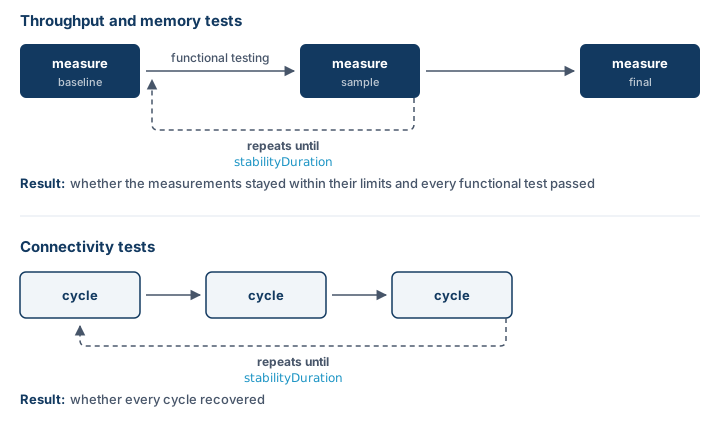
Test Categories
Connectivity tests cycle a connection and verify it comes back. The WAN and LAN link tests bring the link down and up, confirming connectivity is lost while the link is down and restored while it is up. The PPPoE test terminates the PPP link and verifies the client restarts PPPoE Discovery and reestablishes the session. The wireless connectivity tests keep traffic flowing through the DUT and repeatedly verify the client remains associated, failing and reassociating it if it drops.
Throughput stability tests measure a baseline rate on the LAN, then fail if
any later measurement falls more than stabilityPerfMargin
percent below that baseline. The default margin is 10 percent. Because each
test is judged against its own baseline, no expected rate needs to be configured
in advance.
Memory stability tests read the DUT’s memory utilization over USP or CWMP
and fail if any single sample exceeds stabilityMemoryThreshold
percent of the DUT’s total physical memory. The default threshold is 80
percent. Unlike throughput, memory is judged as an absolute percentage rather
than against the baseline.
For both throughput and memory tests, the functional test itself is judged as well. A failed functional test iteration counts against the run no matter what the stability measurements show, so a test can fail on its functional testing alone.
Single Client and Multi-Client Tests
Every test family has a multi-client counterpart, identified by multi in the
module and test name. A multi-client test drives its functional test from every
configured LAN client rather than only the primary one.
For throughput, the difference matters: a multi-client test measures every client’s rate in parallel and judges each client against its own baseline. A single client that is being starved while the others run at full speed fails a multi-client test, but may not exhibit the same failure when run independently in single client testing. For memory, a multi-client test takes one reading of the DUT while every client is working, which surfaces memory growth that only appears once the DUT is handling many clients at once.
Test Setup
Before running Stability and Memory tests, confirm that ordinary Performance tests run successfully against the DUT, since every stability measurement uses the same performance pipeline.
For the memory test modules, the management protocol must be configured and
functional first. Refer to the
CDRouter USP User Guide or the
CDRouter TR-069 User Guide
for details. Once the management protocol is working, run
memory_functional_usp_1 or memory_functional_cwmp_1 to confirm the DUT meets
the data model requirements for memory testing.
Test Modules
The CDRouter Stability and Memory expansion includes the following test modules:
| Test Module | Description | Other Licenses Required |
|---|---|---|
| stability-link | WAN, LAN, and PPPoE connectivity cycling and wireless client monitoring | None |
| stability-link-multi | Connectivity cycling and wireless monitoring across all LAN clients | Multiport |
| stability-perf | IPv4 throughput stability under DHCP churn and traffic load | None |
| stability-perf-v6 | IPv6 throughput stability under address re-acquisition and traffic load | IPv6 |
| stability-perf-wifi | Throughput stability under repeated Wi-Fi reassociation | None |
| stability-perf-multi | IPv4 multi-client throughput stability | Multiport |
| stability-perf-multi-v6 | IPv6 multi-client throughput stability | Multiport and IPv6 |
| stability-memory-usp | IPv4 DUT memory stability read over USP | USP |
| stability-memory-usp-v6 | IPv6 DUT memory stability read over USP | USP and IPv6 |
| stability-memory-cwmp | IPv4 DUT memory stability read over CWMP | TR-069 |
| stability-memory-cwmp-v6 | IPv6 DUT memory stability read over CWMP | TR-069 and IPv6 |
| stability-memory-wifi-usp | DUT memory stability under Wi-Fi reassociation, read over USP | USP |
| stability-memory-wifi-cwmp | DUT memory stability under Wi-Fi reassociation, read over CWMP | TR-069 |
| stability-memory-multi-usp | IPv4 multi-client DUT memory stability read over USP | Multiport and USP |
| stability-memory-multi-usp-v6 | IPv6 multi-client DUT memory stability read over USP | Multiport, USP, and IPv6 |
| stability-memory-multi-cwmp | IPv4 multi-client DUT memory stability read over CWMP | Multiport and TR-069 |
| stability-memory-multi-cwmp-v6 | IPv6 multi-client DUT memory stability read over CWMP | Multiport, TR-069, and IPv6 |
Test Case Naming
Rather than listing every test case, it is easier to read the test names themselves. Every name is built from the same parts, in order:
stability_ + measurement + scope + functional test + address family
- Measurement –
perffor throughput,memory_uspormemory_cwmpfor DUT memory. A name with no measurement is a connectivity test. - Scope –
multiwhen the test drives every LAN client. Absent for single client tests. - Functional test – the stress action the test repeats, from the table below.
- Address family –
_v6for IPv6 tests. Tests that are inherently IPv6, such asslaac_reacq, omit the redundant suffix, and tests that are independent of address family, such as the Wi-Fi tests, carry no suffix at all.
For example:
stability_perf_tcp_single– Measure IPv4 throughput while repeatedly opening a large TCP connection.stability_memory_usp_dhcp_restart– Read DUT memory over USP while repeatedly restarting the LAN client’s DHCP client.stability_memory_multi_cwmp_http_fanout_v6– Read DUT memory over CWMP while every LAN client repeatedly opens IPv6 HTTP connections to several distinct WAN destinations.stability_wan_link– Cycle the WAN link. No measurement is taken.
Functional Tests
| Functional test | Description |
|---|---|
| dhcp_restart | Restart the LAN client’s DHCP client, verifying it receives an address from the configured DHCP pool |
| dhcp_release | Release and restart the LAN client’s DHCP client, verifying it receives an address from the configured DHCP pool |
| slaac_reacq | Force the LAN client to re-acquire its IPv6 address using SLAAC |
| dhcpv6_reacq | Force the LAN client to re-acquire its IPv6 address using DHCPv6, verifying it receives an address from the configured DHCPv6 pool |
| wifi_reassoc | Disassociate and reassociate the wireless client to the same BSSID |
| wifi_reassoc_any | Disassociate and reassociate the wireless client, allowing it to select any BSSID |
| tcp_single | Open a large TCP connection to a WAN server, transfer data, and close it |
| tcp_fanout | Open a TCP connection to each of several distinct WAN destinations |
| http_single | Perform a large HTTP transfer from a WAN server |
| http_fanout | Perform HTTP transfers from each of several distinct WAN destinations |
| dns_single | Send a single large DNS query |
| dns_fanout | Send DNS queries to several distinct destinations |
| bg_traffic | Hold the DUT under a continuous traffic stream for the whole run rather than repeating a stress action |
The connectivity tests in the stability-link and stability-link-multi
modules use link and PPPoE cycling instead, which is described in
Test Categories above.
Some functional tests depend on existing CDRouter configuration:
- The
dhcp_restartanddhcp_releasetests verify the client receives an address from the configured pool, sodhcpClientStartanddhcpClientEndmust match the DUT’s actual DHCP pool. - The
slaac_reacqtests requireipv6LanModeto be set to autoconf, and thedhcpv6_reacqtests require it to be set to DHCP. - The
dhcpv6_reacqtests verify the client receives an address from the configured DHCPv6 pool, soipv6DhcpClientStartandipv6DhcpClientEndmust match the DUT’s actual DHCPv6 pool. - The PPPoE test waits
pppRestartTimeoutmilliseconds for the session to recover. The default is 300000, or 300 seconds.
Configuration
Enabling Stability and Memory
To enable the Stability and Memory expansion, set the
supportsStabilityMemory testvar to yes. The Performance
expansion must be enabled as well:
testvar supportsStabilityMemory  yes
testvar supportsPerformance      yes
If supportsStabilityMemory is left at its default of no,
every Stability and Memory module is skipped. Setting it to yes without the
expansion in your license produces a configuration error.
The memory test modules also require a management protocol. Enable either USP or CWMP, or both, depending on which modules will be used:
testvar supportsUSP   yes
testvar supportsCWMP  yes
The management protocol must be configured and functional before running the memory test modules. For more information, refer to the CDRouter USP User Guide or the CDRouter TR-069 User Guide.
Test Duration
Stability tests run for their full configured duration. With the default
stabilityDuration of one hour, a package containing many
stability test cases can take days to complete. Select test modules
deliberately and size stabilityDuration to the time available.
The following testvars control how long a stability test runs and how often it measures:
The stabilityDuration testvar specifies how long each stability
test repeats its functional test, in seconds. The default is 3600, one hour,
and the maximum is 604800, one week. This covers the functional testing
together with the samples taken during the run. The baseline and final
measurements fall outside it, so a test takes a little longer than
stabilityDuration.
The stabilityFunctionalDuration testvar specifies how long the
functional test runs between the measurements taken during the run, in seconds,
in addition to the measurements taken at the beginning and end. The default is
300, five minutes. Setting it to 0 gives the functional test the whole
run and measures only at the start and finish. It must be less than
stabilityDuration.
Each measurement takes its own time on top of this interval, so samples are
spaced somewhat further apart than stabilityFunctionalDuration
and do not fall on exact multiples of it. Each sample is recorded with the time
it was taken, so a graph of the run still shows accurately when a device
degraded.
The stabilityPerfDuration testvar specifies how long each
individual throughput measurement runs, in seconds. The default is 10. See
Custom Measurement Length for a Throughput
Test for a worked example of
the three duration testvars together.
The stabilityPerfDuration testvar applies only to throughput
measurements. A memory measurement is a single read of the DUT’s
Device.DeviceInfo.MemoryStatus object over USP or CWMP, which takes no
measurable time, so a memory test spends its whole run on functional testing.
The two diagrams below show how the three testvars fit together in each case:
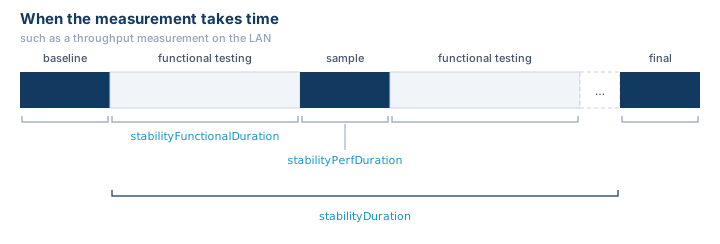
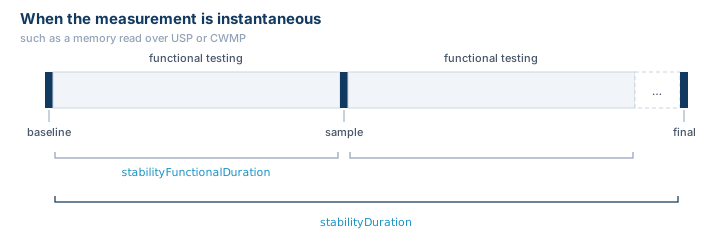
The second diagram omits stabilityPerfDuration because it does
not apply to a memory test.
Pass and Fail Criteria
The following testvars determine whether a stability test passes:
The stabilityMemoryThreshold testvar specifies the maximum
percentage of the DUT’s total physical memory that may be in use during a memory
stability test. A single sample above this percentage fails the test. The
default is 80 percent. This is an absolute measure, not a comparison against
the baseline, so a DUT that normally idles above the threshold needs a higher
value.
The stabilityPerfMargin testvar specifies the maximum percentage
that measured throughput may drop below its baseline during a throughput
stability test. A measurement that falls further than this below the baseline
fails the test. The default is 10 percent.
For example, a test that measures a baseline of 940 Mbps has a floor of 846 Mbps, or 90 percent of 940:
| Measurement | Result |
|---|---|
| 940 Mbps | The baseline |
| 900 Mbps | Passes, a 4.3 percent drop |
| 846 Mbps | Passes, exactly at the floor |
| 820 Mbps | Fails, a 12.8 percent drop |
A measurement below the floor fails the test but does not end the run. Sampling
continues for the rest of the stabilityDuration, so the results
show when the rate fell and whether it recovered.
The stabilityFaultThreshold testvar specifies how many faults a
test tolerates before ending early. The default is 0, which means unlimited:
the test runs for the full stabilityDuration regardless of how
many faults occur. Setting it to 1 ends the test on the first fault, 2 on
the second, and so on. This is useful for a quick smoke check, where there is no
value in soaking a device that has already failed.
Background Traffic
The following testvars control the continuous traffic stream used by the
bg_traffic memory tests and by the wireless connectivity tests
(stability_wifi_connected and stability_wifi_connected_multi):
The stabilityTrafficDirection testvar specifies the direction of
the traffic. upload sends from the LAN client to the WAN, and download
sends from the WAN to the LAN client. The default is download.
The stabilityTrafficType testvar specifies the transport
protocol, either TCP or UDP. The default is TCP. UDP sends at a fixed
rate, which makes a client that has stopped passing traffic unmistakable. With
TCP the rate varies as clients share the available bandwidth.
These two testvars apply only to the continuous background traffic described
above. They have no effect on the throughput measurement taken by the
stability_perf and stability_perf_multi tests, which is always a UDP
download using four streams. Setting
stabilityTrafficDirection to upload does not produce an
upload throughput measurement.
The only part of a throughput measurement that is configurable is its length,
through stabilityPerfDuration. Fixing the transport, direction,
and stream count keeps every measurement in a run comparable to the baseline it
is judged against.
The memory tests other than bg_traffic are also unaffected by these testvars.
Those tests put the DUT under load using their own functional test, such as
tcp_single or http_fanout, rather than the background stream.
Multi-Client Configuration
The multi-client test modules require the Multiport expansion and two or more LAN clients. Configurations with only one LAN client skip these modules.
There is more than one way to reach two or more clients. The
lanClients testvar adds clients to a single LAN interface, and
additional LAN interface groups each contribute their own clients, so a
configuration with an Ethernet LAN and a wireless LAN already has two:
main {
    testvar lanInterface  eth1
}

testvar_group lan2 {
    testvar lanInterface  wifi1-ax
}
What matters to the multi-client tests is the total number of LAN clients across every LAN interface group, however that total is reached. See Using Multiple LAN Interfaces in the CDRouter Multiport User Guide for details.
CDRouter can carry performance traffic on a maximum of 32 LAN clients at once.
The four multi-client bg_traffic memory tests hold every configured client
under traffic, so in configurations with more than 32 LAN clients these four
tests are skipped rather than covering only a subset. All other multi-client
tests are unaffected.
Interpreting Results
A stability test result is decided by three rules:
- A memory sample above
stabilityMemoryThresholdpercent of the DUT’s total physical memory fails the test. - A throughput measurement more than
stabilityPerfMarginpercent below the test’s baseline fails the test. - Any iteration of the functional test that fails counts against the run, as does any measurement that could not be taken at all.
Stability and Memory results are presented in the Stability and Memory View rather than the log files used for other CDRouter results. This view summarizes what each test set out to do, displays the run’s headline numbers such as peak memory and lowest throughput, charts each measurement across the length of the run, and gives a one line verdict describing how the run turned out. Functional checks are shown as a status bar across the whole run, shaded by how many checks failed, so you can see at a glance when the DUT started failing. While a test is running, the Stability and Memory View also shows a live elapsed time.
Example Configurations
Basic Throughput Stability Run
testvar supportsStabilityMemory  yes
testvar supportsPerformance      yes
With no duration testvars set, every stability test uses the defaults. A throughput test then produces the following run:
- A 10 second baseline throughput measurement.
- 5 minutes of functional testing, then another 10 second measurement.
- Step 2 repeats until the run reaches 1 hour.
- A final 10 second measurement, compared against the baseline.
Every measurement after the baseline is judged against it, and the test fails if any of them drops more than 10 percent below.
Custom Measurement Length for a Throughput Test
Setting the three duration testvars changes each part of that run:
testvar supportsStabilityMemory      yes
testvar supportsPerformance          yes
testvar stabilityDuration            7200
testvar stabilityFunctionalDuration  900
testvar stabilityPerfDuration        30
This configuration produces the following test run:
- A 30 second baseline throughput measurement.
- 15 minutes of functional testing, then another 30 second measurement.
- Step 2 repeats until the run reaches 2 hours.
- A final 30 second measurement, compared against the baseline.
The stabilityPerfDuration testvar is what changed here. It sets
how long each individual throughput measurement runs, and it applies to the
baseline, the samples taken during the run, and the final measurement alike.
The default is 10 seconds. Raising it to 30 gives each measurement more
time to settle, which produces a more representative rate on links where a short
measurement is noisy, at the cost of a longer test.
Because the samples taken during the run count against
stabilityDuration, raising
stabilityPerfDuration leaves less of the run for functional
testing. Each stretch of functional testing is still
stabilityFunctionalDuration seconds, but fewer of them fit into
the run.
Overnight Memory Soak Using USP
testvar supportsStabilityMemory      yes
testvar supportsPerformance          yes
testvar supportsUSP                  yes
testvar stabilityDuration            43200
testvar stabilityFunctionalDuration  600
testvar stabilityMemoryThreshold     70
This configuration runs each test for 12 hours, reading the DUT’s memory over USP every 10 minutes and failing if utilization ever exceeds 70 percent of total physical memory.
Multi-Client Run with UDP Upload Traffic
testvar supportsStabilityMemory   yes
testvar supportsPerformance       yes
testvar supportsUSP               yes
testvar lanClients                8
testvar stabilityTrafficType      UDP
testvar stabilityTrafficDirection upload
This configuration drives eight LAN clients and uses a fixed rate UDP upload stream for the background traffic tests, so a client that stops passing traffic is immediately obvious. The throughput measurements in this run are unaffected by these two testvars and remain UDP downloads.
Fail Fast Smoke Check
testvar supportsStabilityMemory      yes
testvar supportsPerformance          yes
testvar stabilityDuration            600
testvar stabilityFunctionalDuration  60
testvar stabilityFaultThreshold      1
This configuration runs each test for 10 minutes, measuring every minute, and ends a test as soon as anything goes wrong. This is a useful way to confirm a configuration is correct before committing to a long run.
Running Stability Tests in Parallel
A package of stability tests occupies a test instance for its full duration, which can be days. On systems with additional test instances, CDRouter can run a stability package against one DUT while other packages run against other DUTs, or split the Stability and Memory modules across several identical DUTs to finish the suite sooner. See Parallel Testing: Running Multiple Packages at Once for setup requirements and planning guidance.
Possible Problems
-
All Stability and Memory tests are skipped – Verify that
supportsStabilityMemoryandsupportsPerformanceare both set to yes, and that both the Stability and Memory and the Performance expansions are enabled in your license. Runcdrouter-cli -infoto confirm. -
Configuration error: Stability and Memory is not enabled in this license –
supportsStabilityMemoryis set to yes but the expansion is not in your license. Contact sales@qacafe.com to add it. -
Multi-client test modules are skipped – The multi-client modules require the Multiport expansion and a total of two or more LAN clients across all LAN interface groups, either through
lanClientsor through additional groups. -
Memory test modules are skipped – The USP modules require
supportsUSPset to yes and the CWMP modules requiresupportsCWMPset to yes. The DUT must also meet the data model requirements for memory testing. Runmemory_functional_usp_1ormemory_functional_cwmp_1to identify any missingDevice.DeviceInfo.MemoryStatus.support. -
Configuration error about stabilityFunctionalDuration – The value of
stabilityFunctionalDurationmust be less thanstabilityDuration. Set it to 0 to measure only at the start and end of the run. -
DHCP functional tests fail immediately – The
dhcpClientStartanddhcpClientEndtestvars must match the DUT’s actual DHCP pool, since each iteration verifies the client received an address from that range. -
DHCPv6 functional tests fail immediately – The
ipv6DhcpClientStartandipv6DhcpClientEndtestvars must match the DUT’s actual DHCPv6 pool, since each iteration of thedhcpv6_reacqtests verifies the client received an address from that range. -
Throughput tests fail at the baseline – The DUT must reach a usable rate before the stability loop begins. Confirm that ordinary Performance tests pass against the DUT first.
-
Wi-Fi tests abort at the start – The wireless client must already be associated when the test begins. Verify the wireless configuration and confirm the client associates successfully outside of a stability test.
-
Memory tests fail on a device that appears healthy –
stabilityMemoryThresholdis an absolute percentage of the DUT’s total physical memory. A device that normally operates above the default of 80 percent needs a higher threshold. -
Tests take far longer than expected – Each test runs for
stabilityDurationon top of the time its measurements take. ReducestabilityDurationor select fewer test modules.
